Veeam vs Acronis vs IDrive: Which Backup Solution Wins?
Nobody buys backup software expecting to use it tomorrow. They buy it hoping they never have to.
Unfortunately, ransomware attacks, accidental deletions, hardware failures, and cloud outages have turned backup into one of the most business-critical investments an IT team can make. When an incident occurs, there is no time to reconsider licensing, move data to another platform, or discover that a clean recovery will take several days.
That is what makes the Veeam vs Acronis vs IDrive decision difficult. All three platforms protect business data, but they solve different problems.
Veeam focuses on enterprise backup, data resilience, and complex recovery. Acronis combines backup, cyber protection, endpoint management, and disaster recovery. And IDrive offers practical business backup software with clear public pricing and less operational complexity.
The financial risk is also significant. IBM placed the global average cost of a data breach at $4.44 million in 2025. Uptime Institute also found that 57% of respondents said their most recent major outage cost more than $100,000, while one in five reported costs above $1 million. (source)
This guide is for IT buyers, infrastructure managers, and SMB or mid-market teams comparing backup solutions in 2026. It explains where Veeam, Acronis, and IDrive are strongest, where they fall short, and which one is the best fit for different business scenarios.
Disclosure: Hyperconvergence may earn a commission from Acronis and IDrive links. This does not affect our analysis or recommendations.
How We Evaluated These Backup Platforms
We reviewed each backup platform using the issues that matter during an actual IT purchase:
- Physical, virtual, cloud, endpoint, and SaaS workload coverage
- File, image, application, and full-system recovery
- Ransomware detection, immutable backup, and safe restore controls
- Disaster recovery, failover, and recovery testing
- Recovery Point Objective and Recovery Time Objective fit
- Pricing and licensing complexity
- Scalability, migration effort, support, and daily administration
These factors also help organizations build a practical backup strategy rather than choosing a product based only on its feature list.
Quick Answer for Busy Buyers
- Choose Veeam if you need enterprise-grade backup, broader workload coverage, stronger virtualization support, and deeper cyber-resilience features.
- Choose Acronis if you want backup, anti-ransomware protection, and disaster recovery in a single platform.
- Choose IDrive if you want the best value, easier deployment, and the clearest public pricing for a smaller team.
Veeam vs Acronis vs IDrive at a Glance
| Platform | Best for | Key Strength | Main Watchout | Pricing Style |
| Veeam | Enterprise and Hybrid Environments | Broad workload coverage and deep recovery | Core platform pricing is less transparent than SMB tools | More consultative |
| Acronis Cyber Protect | Backup Plus Cyber Protection | Backup, security, management, and DR in one platform | Product structure can feel broader than some SMBs need | Per device with optional services |
| IDrive | SMB Value and Easier Purchase | Clear public pricing, cloud backup, Microsoft 365, and Google Workspace protection | Less enterprise depth in orchestration and governance | Highly transparent public storage-based plans |
The quick comparison points buyers in the right direction. However, each platform’s value becomes clearer when you consider the environment it was designed to protect.
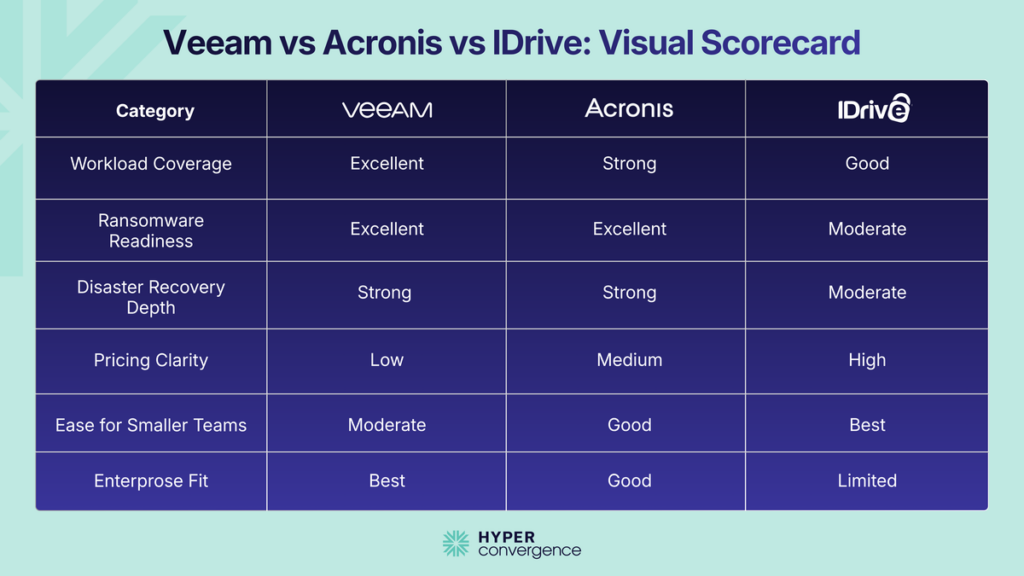
Which Platform Fits Your Environment Best?
Veeam: Built for Enterprise and Hybrid Recovery
If your environment spans VMware, Hyper-V, Nutanix, cloud platforms, Kubernetes, and Microsoft 365, Veeam is built for that kind of complexity.
As an IT buyer, you should not consider Veeam’s main appeal to be the basic backup. Unlike IDrive, which focuses more on straightforward cloud backup, Veeam connects backup infrastructure with cyber resilience, recovery validation, workload portability, reporting, and disaster recovery. Veeam also says it protects 82% of Fortune 500 companies.
For organizations prioritizing backup operations and fast recovery, features such as Veeam’s instant VM recovery can be particularly relevant when virtual machines need to be brought back online quickly.
Why Enterprises Buy Veeam
- Strong VMware, Hyper-V, Nutanix AHV, and hybrid cloud support
- Instant Recovery and Continuous Data Protection options
- Immutable backup repositories and cleanroom recovery
- Malware detection, YARA scanning, and threat analysis
- Role-based access control and single sign-on
- Recovery orchestration and compliance reporting in higher editions
- Portable backups and flexible workload licensing
Limitations to Consider
Veeam has no single core-platform price on its main product page. Buyers must compare editions, calculate protected workloads, and decide which security, monitoring, and orchestration features they need.
That level of control suits mature infrastructure teams, but it can create unnecessary work for a small business that mainly needs endpoint or Microsoft 365 backup.
Pricing and Licensing
Veeam Data Platform comes in three main editions:
- Foundation for core backup and recovery
- Advanced for backup, observability, security, and AI-assisted operations
- Premium for orchestration and compliance capabilities
Veeam uses universal licensing across supported environments. This gives organizations more freedom to move workloads, but the final price still depends on edition, workload count, backup storage architecture, and support.
Bottom Line
Choose Veeam when a failed recovery would create a serious operational, financial, or regulatory problem. It is the strongest option for large virtualized estates, hybrid cloud environments, and companies with strict recovery requirements.
For a wider SMB-focused shortlist, see our guide to the best backup and disaster recovery solutions for SMBs.
Acronis Cyber Protect: Strongest All-in-One Option
Many SMBs do not want separate products for backup, endpoint protection, patching, and disaster recovery. The Acronis approach is designed around that idea.
Instead of treating backup as a separate infrastructure product, it combines backup, anti-malware protection, endpoint management, patch management, and disaster recovery.
That all-in-one model can reduce the number of consoles and agents an IT team or MSP must maintain. Acronis supports Microsoft 365, Google Workspace, Windows, Linux, VMware, Hyper-V, Nutanix, Azure VMs, Proxmox, Citrix, and several other environments. It also lists 300+ technology integrations.
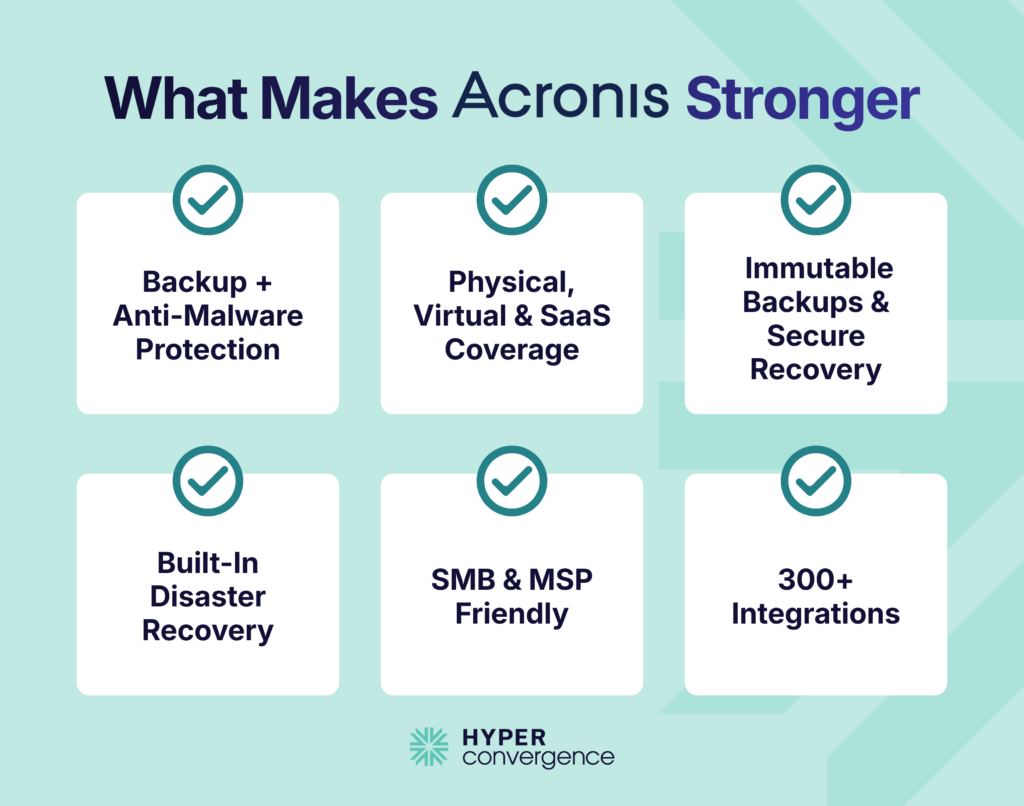
Where Acronis Shines
- Backup, anti-malware protection, and endpoint management in one console
- Coverage for servers, virtual machines, endpoints, and SaaS applications
- Microsoft 365 and Google Workspace backup
- Immutable storage and malware-free recovery options
- Vulnerability assessment and patch management
- Production failover, test failover, and incremental failback
- Strong MSP and service-provider ecosystem
Limitations
The wide product range can make Acronis feel complicated when a company only needs backup. The final price may change significantly once cloud storage, SaaS users, security features, and disaster recovery resources are added.
Buyers should compare editions carefully and confirm which features are included in the quoted package.
Pricing
Acronis states that its small-business offer starts at $85 per device per year. Each protected machine or physical host generally needs a license, while storage, SaaS protection, security, and DR services affect the total.
Who Should Choose Acronis
Acronis is the strongest middle-ground option. It works well for SMB and mid-market teams that need backup, ransomware protection, endpoint management, and disaster recovery without operating several separate products.
IDrive: Best Value for Smaller IT Teams
IDrive focuses on simpler backup and easier purchasing. It protects computers, servers, Exchange, SQL, NAS devices, Microsoft 365, and Google Workspace while publishing prices buyers can review immediately.
Honestly speaking, it does not offer Veeam’s recovery orchestration or Acronis’ integrated security stack. However, many smaller companies do not need that level of depth. They need reliable cloud backup, understandable licensing, and a platform their current team can operate.
Key Strengths
- Clear public pricing
- Business plans with unlimited users
- Support for multiple computers, servers, Exchange, SQL, and NAS
- Microsoft 365 and Google Workspace backup
- Disk-image backup and point-in-time recovery
- Centralized web management
- 24/7 live chat and email support, with phone support during listed business hours
For organizations that prefer local backup alongside cloud protection, the ability to combine different backup approaches can also be an important consideration.
Trade-Offs
- Less disaster recovery orchestration than Veeam and Acronis
- Limited integrated malware detection
- Storage overuse charges can apply
- Some server features require add-ons
- Weaker fit for strict enterprise RPO and RTO targets
Pricing
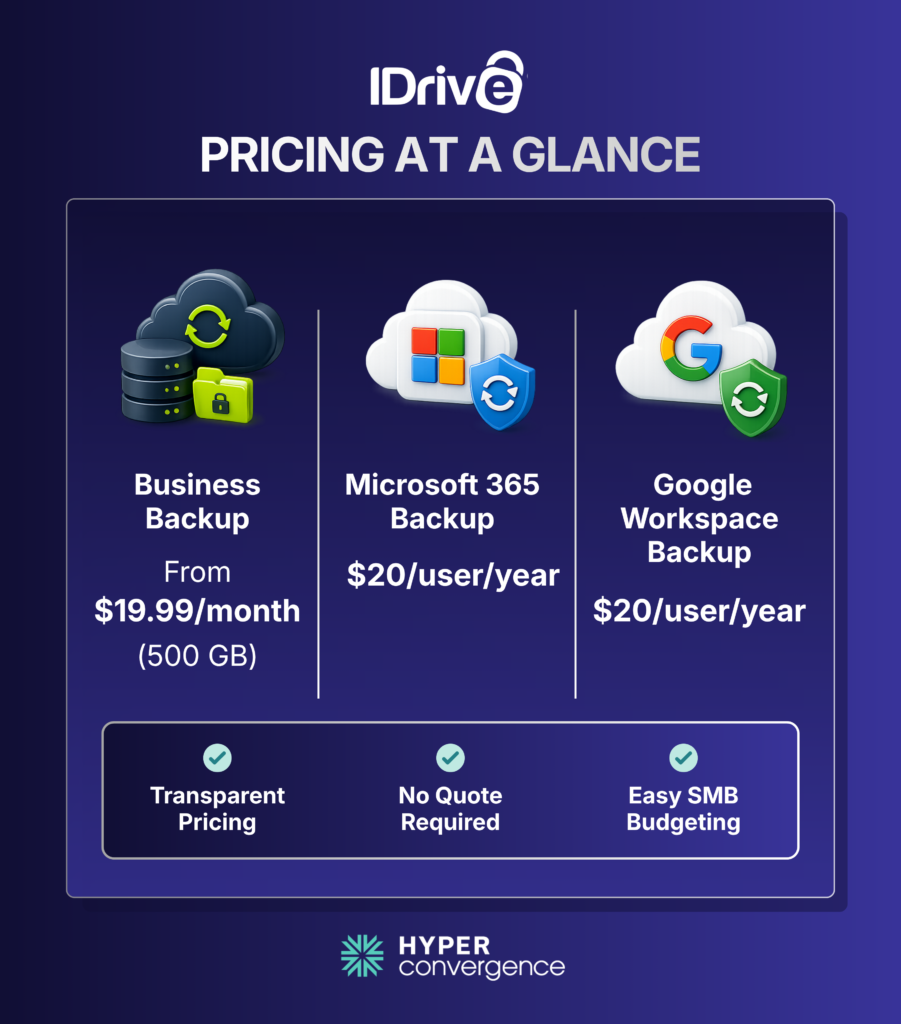
IDrive Business starts at 500 GB for $19.99 per month. The vendor may show a lower first-year promotional rate for new customers.
Its current public prices also include:
- Microsoft 365 backup for $20 per seat per year with unlimited cloud storage
- Google Workspace backup at $20 per seat per year with 10 TB per seat.
- Server backup add-ons for selected plans
- Business-plan overuse charges of $0.50 per GB per month
Ideal Buyer for IDrive
IDrive is best for SMBs, professional services firms, distributed teams, and buyers who need endpoint, server, or SaaS backup without a long sales process.
For hardware failures, bare metal recovery can also matter. Ultimately, compare backup data protection, data security, recovery needs, total cost, and how easily teams can manage backups across mixed environments to choose the best backup solution.
What Makes Veeam, Acronis, and IDrive Different?
At first glance, all three platforms offer reliable backup and recovery. But the real differences become clearer when you compare the workloads they protect, the way they recover data, and the operational complexity they are designed to handle. The sections below show where each one fits best.
Backup Coverage and Workload Support
The workloads a backup platform supports today will determine how well it adapts as your infrastructure grows.
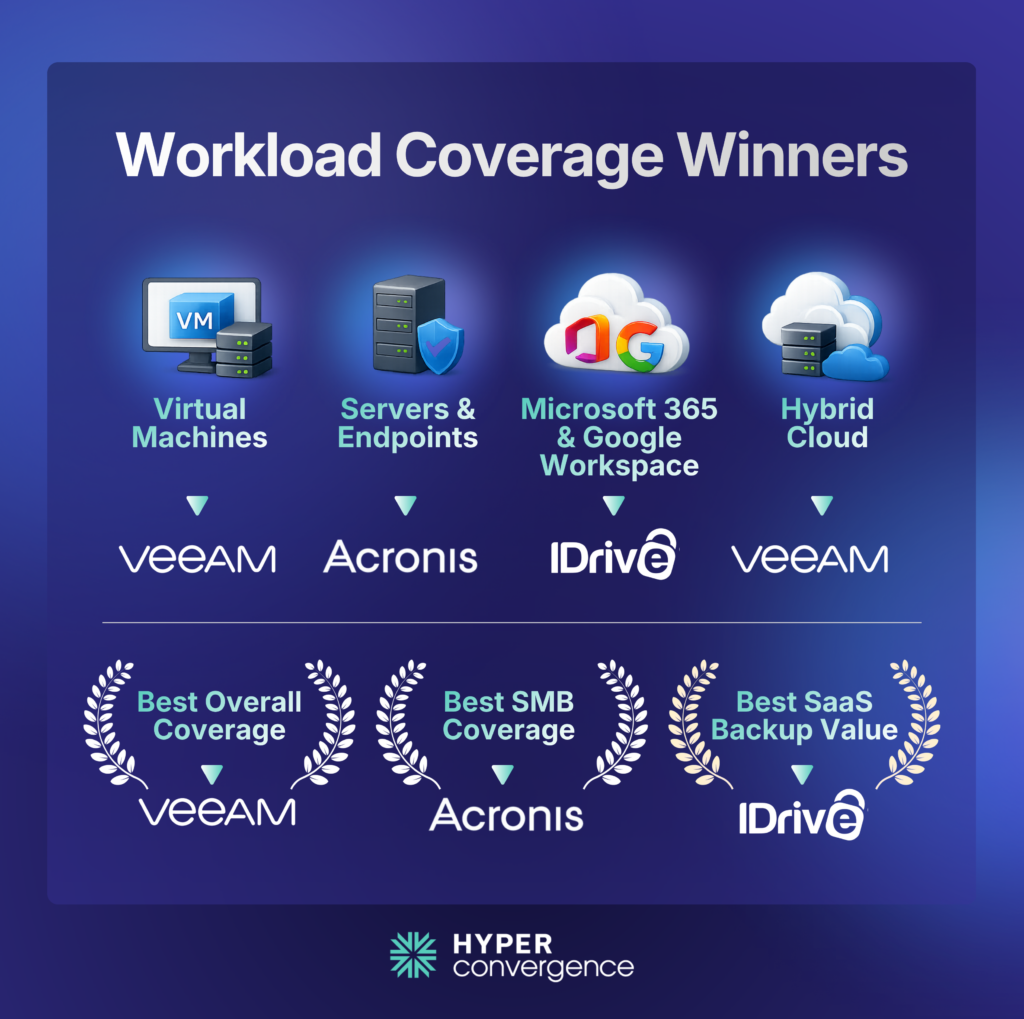
Veeam offers the broadest enterprise workload coverage. Acronis provides the strongest mix of infrastructure, endpoint, SaaS, and security support, while IDrive covers the workloads most SMBs rely on with fewer enterprise-focused recovery capabilities.
That difference matters as IT environments become more distributed. According to the Flexera 2026 State of the Cloud Report, 73% of organizations now operate hybrid cloud environments. Likewise, the Microsoft Shared Responsibility Model for Microsoft 365 explains that customers remain responsible for protecting their own business data, making dedicated backup an important part of any Microsoft 365 deployment.
| Workload | Veeam | Acronis | IDrive |
| VMware and Hyper-V | Excellent | Strong | Good |
| Physical Servers | Strong | Strong | Strong |
| Endpoint Backup | Good | Excellent | Strong |
| Microsoft 365 | Excellent | Strong | Strong |
| Google Workspace | Not a primary focus | Strong | Strong |
| Public Cloud Workloads | Excellent | Strong | Limited to moderate |
| Kubernets | Excellent | Limited focus | Limited |
Performance and Storage Efficiency
Performance is about more than backup speed. Efficient data transfer, storage optimization, and recovery performance all affect long-term operating costs besides cost efficiency.
Veeam combines Changed Block Tracking (CBT), inline deduplication, compression, and WAN acceleration to reduce backup windows in large virtualized environments.
Acronis uses incremental and differential backups together with block-level deduplication to reduce repeated data transfers and storage consumption. Acronis delivers these capabilities as part of its broader protection model, rather than treating storage efficiency as a standalone feature.
IDrive transfers only changed data after the initial backup, supports Continuous Data Protection (CDP) for supported files, and offers IDrive Express to speed up large initial backups.
| Platform | Main Efficiency Tools | Best Fit |
| Veeam | CBT, compression, deduplication, WAN acceleration | Large virtual and multi-site environments |
| Acronis | Incremental chains, block-level deduplication | Mixed endpoints, servers, and VMs |
| IDrive | Incremental transfer, CDP, IDrive Express | Smaller teams and slow initial uploads |
Backup and Recovery Capabilities
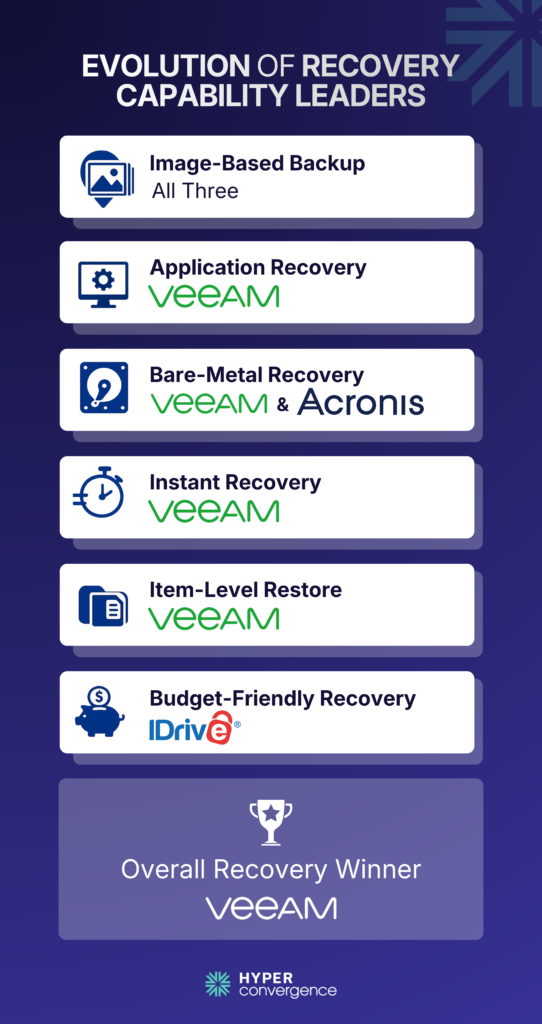
All three platforms support image-based and file/folder backup, but their recovery depth differs.
- Veeam stands out for application-aware backup, instant recovery, item-level restores, and broader enterprise recovery workflows.
- Acronis combines image-based backup with strong application-aware and bare-metal recovery, making it suitable for SMB and mid-market environments.
- IDrive offers disk-image and bare-metal recovery through IDrive BMR, providing practical business protection at a lower-cost positioning.
Overall, Veeam offers the deepest recovery capabilities, Acronis provides a balanced all-in-one approach, while IDrive focuses on straightforward, cost-effective backup and recovery.
Ecosystem and Integrations
Backup becomes more valuable when it integrates with the rest of your IT operations. A unified platform can also reduce management overhead when security, monitoring, and backup workflows need to work together.
Veeam offers the broadest enterprise ecosystem with integrations for AWS, Microsoft, Nutanix, ServiceNow, Splunk, CrowdStrike, Cisco, Dell, HPE, and NetApp.
Acronis lists more than 300 integrations across security, cloud, and MSP platforms, including Microsoft Sentinel integration for Acronis Cyber Protect Cloud.
IDrive focuses on direct integration with VMware, Hyper-V, Microsoft 365, Google Workspace, NAS devices, and common business servers. Organizations that depend on SIEM or ITSM automation should verify integration requirements before purchasing.
Scalability, Migration, and Onboarding
The best backup platform should support future growth without making migration unnecessarily complex. This becomes particularly important for MSPs that manage multiple clients or organizations that need to support multiple clients across different environments.
Veeam scales most effectively across hybrid cloud, Kubernetes, and large virtual environments. Acronis expands smoothly as organizations add endpoints, servers, SaaS users, and security services. IDrive scales through storage tiers and remains better suited to straightforward business growth.
Before switching platforms, verify backup migration options, bandwidth requirements, restore testing, retention policies, legal-hold requirements, and any storage or cloud-egress charges. Teams should also confirm compatibility across supported file systems before migrating existing backup jobs.
Recovery, Ransomware Protection, and DR Depth
A successful backup means little if recovery fails during a ransomware attack. Strong business continuity therefore depends not only on storing copies, but also on how reliably organizations can execute their recovery processes.
According to the Veeam 2025 Ransomware Trends Report, 89% of organizations had backup repositories targeted by attackers, and 34% of repositories were modified or deleted. That makes immutable storage, malware detection, and recovery validation critical buying considerations.
RPO and RTO Matter More Than Backup Speed
The NIST Computer Security Resource Center – Contingency Planning Guide defines Recovery Point Objective (RPO) as the maximum acceptable amount of data loss and Recovery Time Objective (RTO) as the acceptable downtime before services are restored.
Veeam and Acronis better support strict RPO and RTO targets through advanced recovery automation, while IDrive is a practical choice for organizations focused on dependable backup and restore. For environments where recovery speed is critical, buyers should evaluate the actual recovery workflow rather than relying solely on advertised backup performance
| Capability | Veeam | Acronis | IDrive |
| Image and item-level recovery | Excellent | Strong | Strong |
| Instant workload recovery | Excellent | Strong | Limited |
| Immutable backup options | Excellent | Strong | Limited to moderate |
| Integrated malware scanning | Excellent | Excellent | Limited |
| Production failover | Excellent | Strong | Limited |
| Automated recovery testing | Excellent | Strong | Limited |
| Fit for strict RPO and RTO targets | Best | Strong | Moderate |
Pricing and Licensing: Which One Is Easier to Buy?
Buying complexity varies almost as much as pricing. For buyers comparing total cost, it is important to distinguish the subscription price from the full cost of operating and maintaining the platform.
IDrive offers the clearest public pricing. Acronis provides a visible starting point but requires buyers to choose additional services, while Veeam follows a more consultative enterprise licensing model.
| Platform | Public Starting Point | Pricing Clarity | Main Cost Factors |
| Veeam | No single core-platform list price | Low | Edition, workloads, storage, deployment, support |
| Acronis | $85 per device per year | Medium | Device type, storage, Saas, security, DR |
| IDrive | $19.99/month for 500 GB | High | Storage tier, Saas seats, add-ons, overuse |
Beyond subscription costs, compare storage growth, retention, migration, support, disaster recovery resources, and administration to estimate the true three-year ownership cost. Also account for any additional cost associated with storage expansion, recovery infrastructure, or optional services.
Support, Compliance, and Day-to-Day Management
The right platform should match both your technical requirements and your team’s operational capacity. A user-friendly interface can be particularly valuable for lean teams that do not have dedicated backup specialists.
Veeam provides the deepest reporting, governance, and enterprise administration features. Acronis simplifies management by combining backup, endpoint security, and disaster recovery in one console. IDrive prioritizes ease of use for lean IT teams with less complex environments.
| Category | Veeam | Acronis | IDrive |
| Day-to-day simplicity | Moderate | Strong | Strong |
| Enterprise administration | Excellent | Good | Limited |
| Centralized backup and security | Strong | Excellent | Limited |
| Reporting and policy depth | Excellent | Strong | Moderate |
| Bestteam fit | Mature infrastructure teams | SMB and mid market generalists | Lean IT teams |
Fast Decision Path
| Buyer Question | Recommended Direction |
| Large VMware, Hyper-V, Kubernetes, or hybrid cloud environment? | Start with Veeam |
| Backup, endpoint security, patching, and DR in one console? | Start with Acronis |
| Clear public pricing and simple SaaS backup? | Start with IDrive |
| Strict RPO, RTO, testing, or compliance requirements? | Compare Veeam and Acronis |
| Lean team protecting endpoints, servers, or SaaS data? | Start with IDrive |
Veeam vs Acronis vs IDrive: Final Verdict
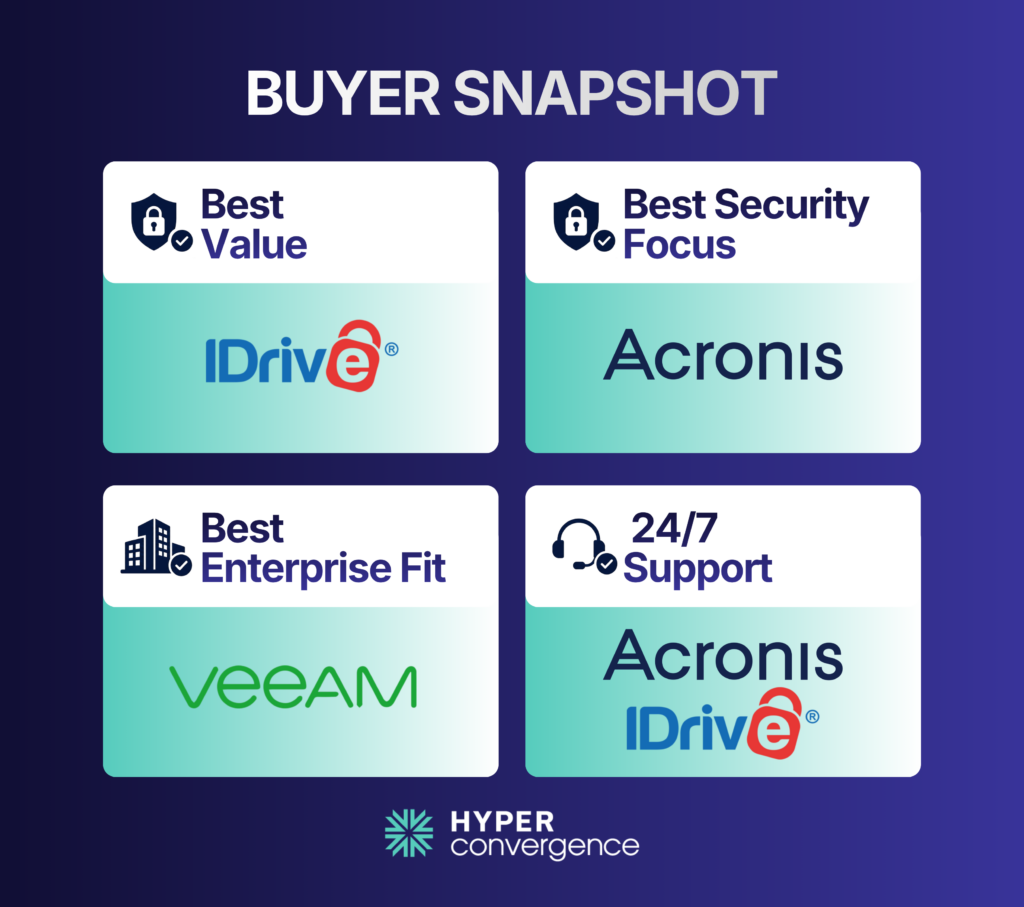
There is no single winner for every business.
- Veeam wins for enterprise-grade backup, hybrid environments, and broader workload coverage.
- Acronis wins for buyers who want backup, cyber protection, and DR in one platform.
- IDrive wins for SMB value, simpler deployment, and the clearest pricing model.
| Business Need | Recomendation |
| Enterprise | Veeam |
| SMB | IDrive |
| MSP | Acronis |
| Microsoft 365 | Tie |
| Hybrid Cloud | Veeam |
| Disaster Recovery | Acronis |
| Lowest Cost | IDrive |
That is the real answer behind this comparison. The best platform is the one that matches your recovery needs, IT maturity, and operating model, not just the one with the longest feature list.
Conclusion
Veeam serves deeper infrastructure and recovery needs. Acronis reduces tool sprawl through integrated backup, security, management, and DR. IDrive gives smaller teams clear pricing and straightforward SaaS protection.
Start with the workloads that generate revenue or support critical operations. Set realistic RPO and RTO targets, calculate the complete three-year cost, and test every shortlisted platform with the same recovery scenario.
Features are easy to compare. Recoveries are not. The best backup platform is the one that restores your most important workloads within the recovery time your business can tolerate. Build the shortlist around that goal first, then compare pricing, security, and management.
FAQs
Veeam is better for large virtualized, hybrid, and enterprise environments that need deeper recovery and orchestration. Acronis is the better fit when you want backup, endpoint security, and disaster recovery in one platform.
Acronis offers stronger ransomware protection, endpoint management, and disaster recovery. IDrive is better for smaller businesses that prioritize simple management and clear public pricing.
IDrive is usually the simplest option for small businesses with straightforward backup needs. Acronis makes more sense when the business also needs endpoint security and disaster recovery.
Veeam is the strongest choice for larger VMware and Hyper-V environments because virtualization backup and recovery are major parts of its platform. Acronis is also a strong option for smaller mixed environments.
Both are strong. Veeam focuses more on immutable backups, threat detection, clean recovery, and enterprise cyber resilience, while Acronis combines backup with built-in anti-malware and endpoint protection.
Veeam offers deeper enterprise Microsoft 365 protection, while IDrive provides simpler pricing at $20 per seat per year. Acronis is a good choice if Microsoft 365 backup needs to sit alongside endpoint security and other workloads.
IDrive is well suited to SMBs and lean IT teams protecting computers, servers, NAS devices, and SaaS data. Larger enterprises with strict recovery, orchestration, and governance requirements may find Veeam or Acronis more suitable.
Veeam is the strongest overall choice for strict RPO and RTO requirements. Acronis is also strong for businesses that need failover and recovery testing without moving to a heavier enterprise platform.
IDrive has the clearest public pricing; Acronis provides a public starting price but adds costs based on workloads and services, and Veeam requires the most licensing and sales discussion before the final cost is clear.
For many businesses, yes. Microsoft protects the availability of its cloud infrastructure, but organizations remain responsible for protecting and recovering their own business data according to their retention and recovery requirements.
[…] you’re comparing Acronis vs IDrive for SMB backup, see the Veeam vs Acronis vs IDrive comparison for a closer look at their features, pricing, and recovery […]