Traditional IT infrastructure is becoming harder to manage in a world that demands speed, scalability, and simplicity. On the other hand, hyperconverged infrastructure (HCI) is a solution that brings everything into one neat, software-defined package.
But what is hyperconverged infrastructure? It’s a modern way to build and manage IT systems by combining servers, storage, and networking into one single platform. Instead of using different pieces of hardware, everything runs on regular servers, and the software controls how the resources are used.
Whether you’re an IT professional or someone trying to understand modern data centers, this guide will walk you through the essentials of HCI in the easiest possible way.
You’ll learn how HCI works, where it’s used, and what benefits and challenges it brings alongside the key differences between converged and hyperconverged infrastructure.
So, let’s dive in!
What Is Hyperconverged Infrastructure?
Hyperconverged infrastructure (HCI) is a modern approach to building IT infrastructure. It combines computing, storage, and networking into a single, software-driven system. Rather than dealing with separate hardware for each function, HCI pulls everything together and manages it through a central software layer.
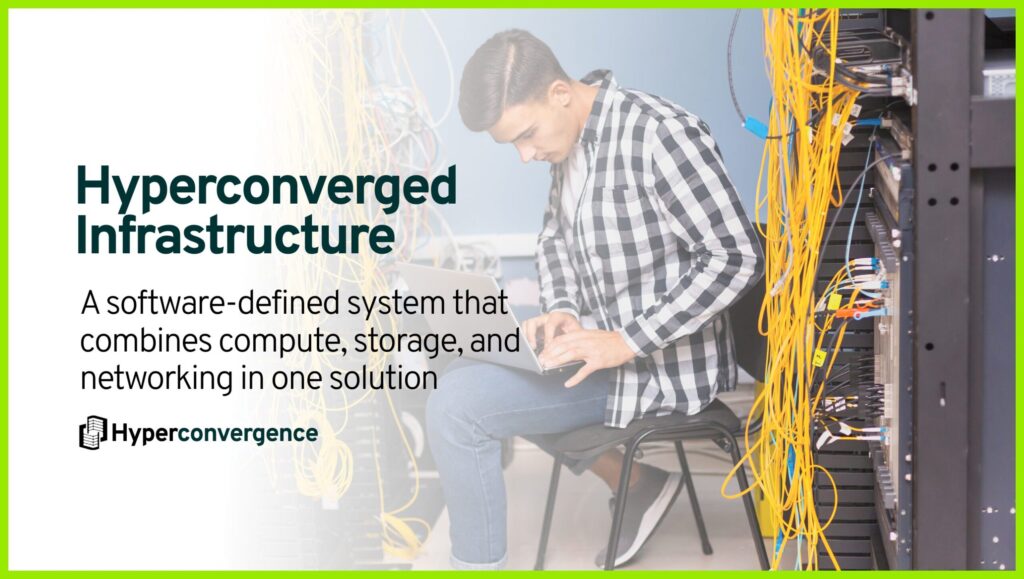
In traditional setups, you might have one machine for computing tasks, another system for storing data, and separate switches and networking equipment to connect everything. Managing this kind of setup can be time-consuming and expensive. You also need skilled people for data center management, and the systems often come from different vendors, making compatibility an ongoing issue.
HCI simplifies all of that. Everything runs on standard x86 servers, and the software handles distributing workloads, storing data, and connecting systems. This design helps reduce data center complexity and makes scaling easier.
You do not need to buy or maintain separate physical hardware for storage or networking. Instead, you can control everything from a single interface, which saves both time and resources.
At its core, HCI relies on virtualization. It uses:
- Virtualized computing: managed by a hypervisor.
- Software-defined storage: spreads data across the cluster for speed and reliability.
- Virtual networking: connects all components internally without the need for external switches.
How Does It Work?
HCI runs on a group of standard servers, often called nodes. Each node has its own processor, memory, and storage, like hard drives or SSDs. When these nodes are connected, they work together as one system. Naturally, this setup removes the need for separate hardware for storage or networking.
Each part of the system plays a specific role as follows:
1. Virtualization Layer
This is where virtual machines (VMs) run. A hypervisor such as VMware ESXi, Microsoft Hyper-V, or Nutanix AHV creates and manages these VMs. It allows several applications to share the same physical hardware without interfering with one another, which is critical for running business critical applications.
2. Storage Virtualization
Instead of storing data in a central storage device, each node contributes its local storage. The system then combines all of that into one large, shared storage pool. Software manages where data is stored and how it’s accessed, offering high performance and redundancy- something essential for both on-premises infrastructure and public cloud services.
3. Network Virtualization
The system also takes care of internal networking. It creates virtual versions of switches, firewalls, and routers. This means traffic can be controlled, filtered, and balanced without needing separate physical equipment.
4. Management Plane
Everything is controlled through a single interface or dashboard. From here, admins can create virtual machines, allocate storage, monitor performance, and add new nodes when needed.
With this structure, HCI simplifies daily operations. There’s no need to deal with separate systems for storage, computing, and networking. Everything is tightly integrated and controlled through software.
What Are the Key Components of HCI?
Hyperconverged systems are powered by a software-defined architecture that brings together several essential components into a single, unified platform. These components work together to deliver flexibility, scalability, and simplified operations across different workloads.
So, the core components include:
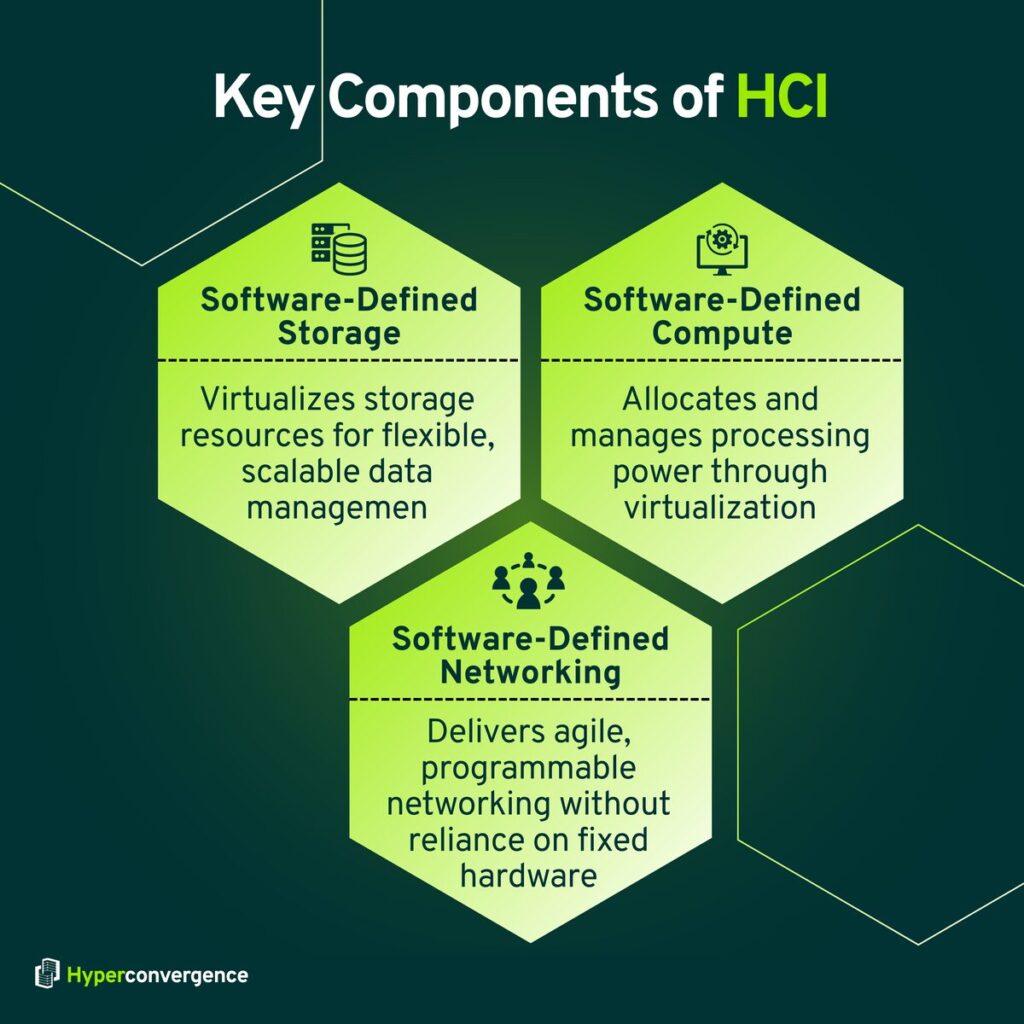
1. Software-Defined Storage (SDS)
In an HCI system, storage isn’t tied to a central device like in traditional setups. Instead, each server contributes its own local storage, HDDs or SSDs, which are combined into a shared virtual pool. This pool can be allocated to applications as needed, making storage more flexible and easier to scale across hybrid cloud deployments.
2. Software-Defined Compute
Compute power comes from virtualization. Hypervisors run multiple virtual machines (VMs) on each physical server, allowing businesses to use resources more efficiently. This setup supports better workload distribution and reduces hardware dependency, strengthening IT infrastructure performance.
3. Software-Defined Networking (SDN)
The network layer is also virtualized. That means tasks like traffic control, firewall rules, and load balancing are handled through software instead of hardware switches or routers. This approach allows for faster configuration and simpler network management, which is valuable in both converged and hyperconverged infrastructure solutions.
Beyond the basics, HCI provides added benefits like easier data backup, disaster recovery, and improved security. Its ability to support cloud computing strategies while integrating hybrid cloud flexibility makes it an attractive choice for organizations modernizing their infrastructure.
Converged vs. Hyperconverged Infrastructure
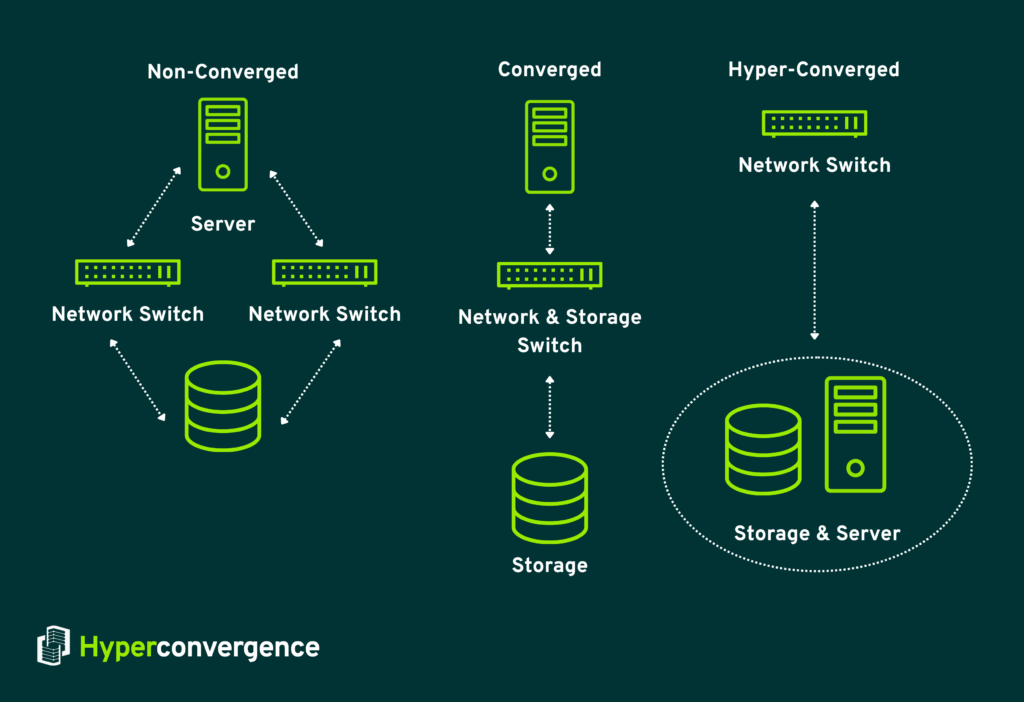
Many people confuse converged infrastructure (CI) with hyperconverged infrastructure (HCI). The difference lies in how resources are built, managed, and scaled.
The Rise of Converged Infrastructure
Converged infrastructure emerged as businesses struggled with complex legacy infrastructure and multi-vendor IT setups. Vendors like Dell EMC and Cisco offered integrated systems combining compute resources, storage resources, and networking into a pre-configured package.
In a converged system, storage arrays, compute servers, and network switches remain separate servers, even though they are bundled together. Deployment is faster than assembling each component from scratch.
Advantages of Converged Infrastructure
- Faster deployment compared to traditional infrastructure setups
- Reduced compatibility issues among compute, storage, and network components
- Simplified support with fewer vendors involved
Limitations
Even though CI reduces some complexity, IT teams still manage each component individually. Storage resources are handled via separate consoles, and compute resources require their own tools. Scaling often means purchasing full blocks of hardware. Proprietary systems create vendor lock-in.
How Hyperconverged Infrastructure Is Different
HCI combines compute resources, storage resources, and networking into a single system. It runs on commodity hardware with a software layer that handles virtualization and operating functions. A single interface provides unified management for all operating system tasks.
There are no separate servers or storage arrays. For those exploring what hyperconverged storage is, it refers to the tightly integrated storage component within HCI that scales alongside compute power, removing the need for traditional SAN or NAS systems.
IT teams can scale compute resources or storage performance as needed. HCI reduces energy consumption and cuts complexity while supporting cloud-native applications and public cloud integration.
Switching from traditional 3-tier architectures to HCI can reduce energy consumption by over 27% annually- saving up to 92 TWh of electricity and eliminating 19 million tonnes of CO₂e in EMEA by 2030.
Here are what sets HCI apart:
- Compute and storage resources managed through one console
- Ability to scale incrementally without disrupting operations
- Reduced reliance on traditional infrastructure
- Supports hybrid deployment and public cloud workloads
- Modern HCI can reduce data center complexity while maintaining business-critical applications
CI vs HCI at a Glance
| Converged Infrastructure | Hyperconverged Infrastructure |
| 1. Hardware-centric with separate compute, storage, and networking. 2. Pre-configured but managed through multiple systems. 3. Scaling often requires large, costly hardware additions. | 1. Software-driven, combining compute, storage, and networking in one system. 2. Managed through a single interface with automation. 3. Scales flexibly by adding nodes as needed. |
HCI vs. Cloud: What’s the Real Difference?
Hyperconverged infrastructure and public cloud might appear similar, but they operate differently. HCI resides on-premises and provides defined capacity with compute and storage resources allocated through virtualization. Cloud platforms offer on-demand compute resources and storage resources, often including cloud-native applications.
Many organizations use both. HCI handles latency-sensitive and business-critical applications in-house, while public cloud serves as backup, disaster recovery, or seasonal capacity. Platforms like Azure Stack HCI and VMware Cloud Foundation combine HCI with cloud-native applications for hybrid strategies.
HCI is a hardware-based solution with a defined capacity. It combines compute, storage, and networking into a single software-driven platform, typically located on-premises.
Virtualization abstracts the physical resources, while a software layer governs how these resources are distributed to workloads. The setup is centralized, making it easier to control performance, latency, and security.
Cloud infrastructure, on the other hand, functions more like a service utility. It offers a massive pool of virtual resources that can be spun up or shut down as needed.
In addition to raw compute and storage, cloud platforms come with prebuilt services ike databases, monitoring tools, and load balancers that users can quickly deploy. It’s designed for scalability and flexibility rather than complete control.
Here is a quick comparison between the two:
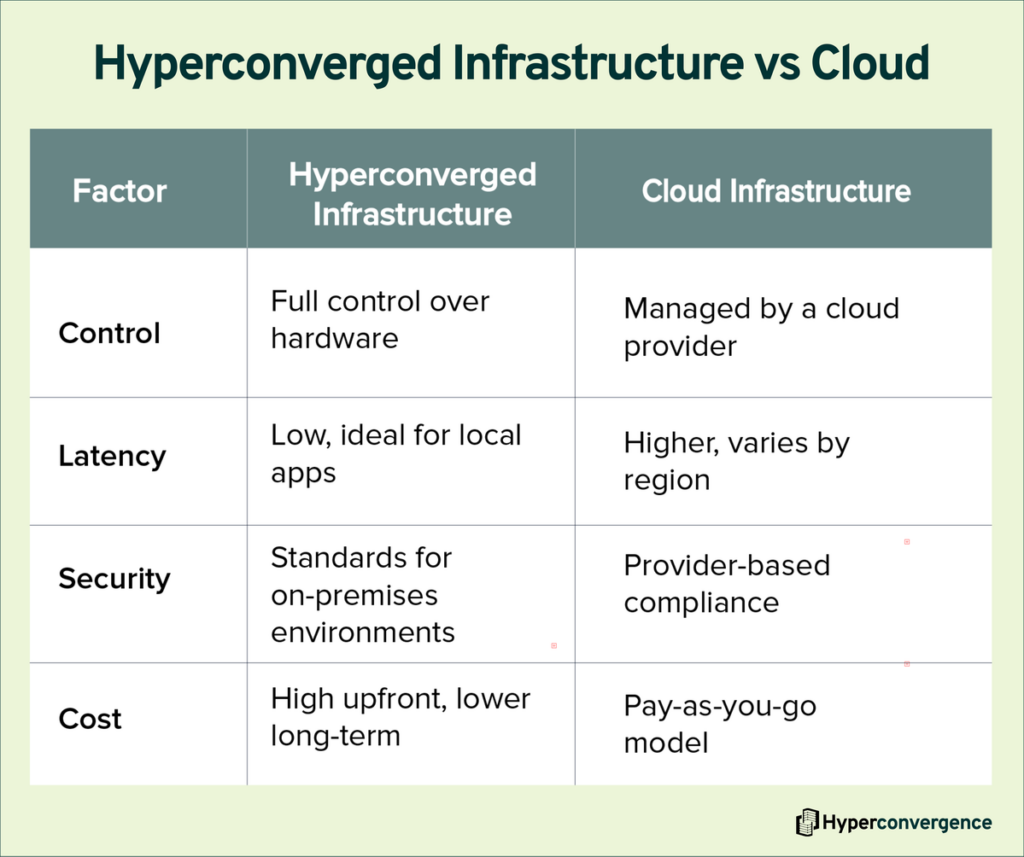
However, some organizations choose both. For instance, HCI might power critical, latency-sensitive workloads in-house, while cloud platforms are used for backups, disaster recovery, or seasonal demand spikes.
In fact, many modern HCI platforms support private or hybrid cloud architectures, bridging the gap between local infrastructure and the flexibility of the public cloud.
Solutions like Azure Stack HCI or VMware Cloud Foundation on VxRail are good examples; they run cloud-native software stacks directly on HCI hardware, blending the best of both worlds.
Benefits of Hyperconverged Infrastructure: Why Is It Important?
The benefits of hyperconverged infrastructure (HCI) extend far beyond cost savings and simpler operations. This model changes the way infrastructure work gets done, bringing agility and resilience to modern IT systems.
IDC reports that organizations using HCI cut hardware expenses and IT management time significantly within three years. (Source)
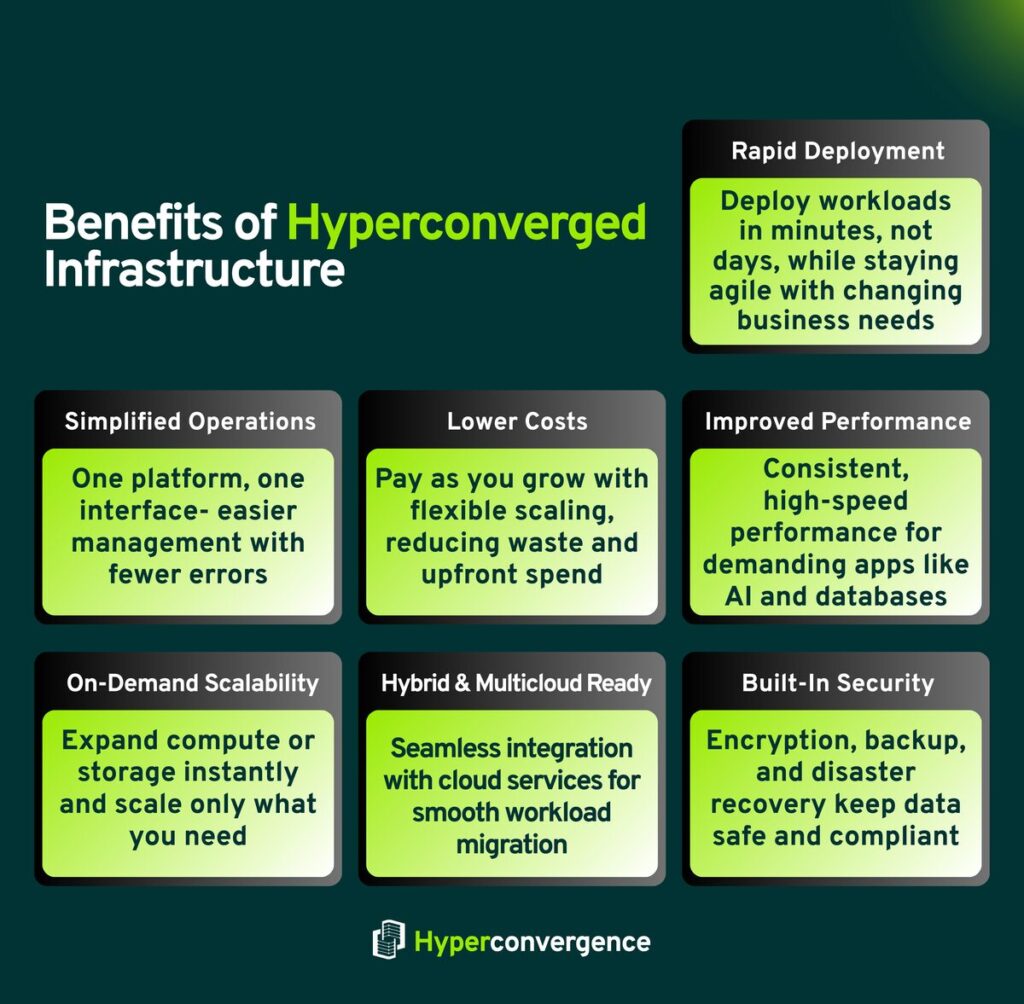
1. Rapid Deployment
HCI combines different components, compute, storage, and networking, into one software-managed system. Workloads can be deployed in minutes rather than days, which is critical for adapting to changing business requirements.
IDC’s study of Dell’s APEX HCI found that new compute resources came online 60% faster, while storage expanded 67% faster. These improvements added $9.21 million in annual revenue per organization and reduced unplanned downtime by 91%.
2. Simplified Operations
No need to juggle multiple consoles or incompatible systems. A hyperconverged platform offers a single interface that automates routine management and reduces errors. IT teams can manage compared to traditional setups with far less effort, leaving more time for innovation.
3. Lower Total Cost of Ownership
Scaling happens gradually instead of through massive upfront purchases. Flexible scaling lets organizations add capacity only when needed, reducing waste. A Nutanix-commissioned report estimated companies in the EMEA region could save up to €25 billion by 2030 through efficient operations and smarter energy use.
4. Improved Performance
Modern clusters are built to handle high-demand workloads such as enterprise databases. Since processing stays within the cluster, applications remain responsive and predictable. Artificial intelligence applications also benefit from this performance consistency, particularly when data throughput is critical.
5. On-Demand Scalability
Adding a server node expands the environment instantly. Some platforms allow compute and storage to scale independently, which keeps costs tied to actual needs. This flexibility makes infrastructure work more predictable and reliable.
6. Hybrid and Multicloud Flexibility
HCI connects naturally with cloud services. A hyperconverged platform makes workload migration straightforward, letting businesses balance local systems with public cloud resources without major reconfiguration.
7. Built-In Security and Backups
Encryption, replication, and disaster recovery are built into most systems. These features give confidence that critical information stays safe, even during outages. Cisco Intersight, for example, supports centralized visibility across clusters while strengthening compliance controls.
These advantages matter most for organizations with small IT teams or those running operations across many locations. The combination of lower costs, simpler management, and flexible scaling matches the pace of modern IT demands.
The Challenges
Despite its strengths, HCI is not free from limitations. Users and experts often highlight the following challenges:
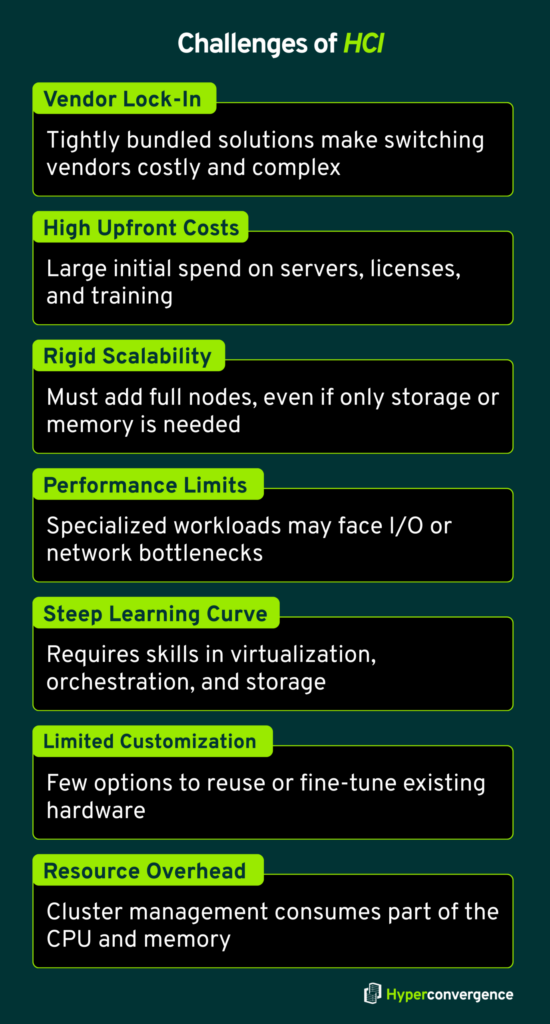
1. Vendor Lock-In
Most solutions bundle hardware and software running as a tightly integrated package. Once adopted, moving to another vendor can be difficult and expensive.
2. High Initial Costs
Although cost efficiency grows over time, the upfront investment is significant. New servers, licenses, and training can strain budgets.
3. Scalability and Resource Rigidity
Scaling requires adding entire nodes, even when only storage or memory is needed. This rigidity may result in underused resources.
4. Performance and Network Constraints
While general workloads run well, specialized ones may encounter bottlenecks. High I/O requirements, such as large databases, demand careful network planning.
5. Learning Curve and Skill Constraints
HCI demands knowledge of virtualization, orchestration, and distributed storage. Without proper training, teams risk misconfigurations that expose vulnerabilities.
6. Limited Hardware Customization
Because these platforms are designed as ready-to-deploy units, hardware customization options remain limited. Businesses cannot always reuse existing devices or fine-tune systems for unique requirements.
7. Virtual Resource Overhead
A portion of the CPU or memory often supports internal cluster management. This overhead reduces the capacity available for applications.
Common Use Cases of Hyperconverged Infrastructure
HCI adoption is expanding across industries, supporting a wide range of needs, including:
Remote and Branch Offices (ROBO): Compact design, minimal equipment, and centralized control make HCI ideal for offices with few IT staff. Cisco Intersight is often used in these setups to simplify ongoing management from a central dashboard.
Virtual Desktop Infrastructure (VDI): Hospitals, schools, and enterprises use HCI for virtual desktops. A hyperconverged platform supports fast provisioning, consistent updates, and a smooth end-user experience.
Disaster Recovery (DR): Built-in replication and failover reduce recovery times while avoiding the cost of separate backup systems.
Dev/Test Environments: Developers can test applications quickly, thanks to software running in isolated virtual machines and containers. This separation improves reliability before production deployment.
Database and Analytics: Low latency and strong throughput make HCI effective for real-time analytics and data-heavy workloads.
Edge Computing: In industries like retail and manufacturing, different components of HCI sit closer to data sources, reducing latency and supporting real-time decisions.
Real-World Examples: How Companies Use HCI Today
Let’s see how hyperconverged frameworks are widely integrated in real-life applications:
Healthcare: A hospital uses HCI to centralize patient records across branches with strict data compliance. It deploys built-in disaster recovery and real-time replication so that no patient data is lost even during hardware failures.
For example, hospitals like St. John’s Riverside saw a ~50 % performance boost by combining storage, compute, and built-in backup and DR in one HCI platform. (source)
Retail Chains: A chain of stores runs all its POS systems on HCI for consistency. They also get centralized inventory updates and reporting across all outlets in near real time, which reduces stockouts and improves forecasting.
Some large omni-channel retailers use centralized dashboards backed by hyperconverged infrastructure so that online, in-store, and kiosk sales all reflect the same stock and pricing instantly.
Finance: Banks use HCI to power secure, low-latency data centers. They leverage built-in encryption, one-click failover, and backup features to meet regulatory requirements and minimize risks in case of breaches or disasters.
For instance, Bank of Stockton adopted Nutanix HCI with HYCU to double performance, cut backup windows from days to hours, and ensure data protection under strict compliance regimes.
Education: Universities deploy HCI for online learning platforms. They benefit from scalable virtual desktop infrastructure, allowing students and faculty to access lab software, lectures, and resources remotely during peak times.
With HCI, universities simplify management by consolidating multiple campus data centers, improving uptime, and cutting energy and maintenance costs as student demand fluctuates.
The Future of HCI: Why More Companies Are Adopting It
HCI isn’t just a trend; it’s becoming the foundation of modern IT strategy. As organizations move away from the conventional, rigid, hardware-centric data centers, HCI provides the flexibility, scalability, and automation required for today’s dynamic workloads.
Below are the driving forces for the future growth of HCI:
- Private and Hybrid Cloud Support: More companies are replacing old systems with cloud-like infrastructure. HCI makes it easier to manage and scale across different locations.
- Simple, Unified Infrastructure: HCI combines compute, storage, and networking in one system, reducing complexity and streamlining operations.
- Support for Modern Applications: Many HCI platforms now work well with containers and tools like Kubernetes, helping DevOps teams run and manage apps faster.
- Ready for AI and Analytics: With fast storage (like NVMe) and GPU support, HCI can handle tasks like machine learning, big data, and real-time processing.
- Ideal for Edge Computing: HCI is compact and easy to manage, making it perfect for use in remote offices, retail stores, and factory sites.
As businesses seek scalable and intelligent infrastructure, HCI is evolving rapidly, positioning itself as a long-term solution for future-ready IT environments. Therefore, the global value of the HCI market is expected to reach USD 25 billion by 2033, growing at a CAGR of 15.5%.
Management and Implementation: What Should You Look for in a Hyperconverged Solution?
The best hyperconverged infrastructure solutions balance resilience, flexibility, and ease of management, making them a strong fit for both current and future IT needs. Although picking an HCI platform requires more than checking off features. To set your team up for success, you’ll want a plan that aligns with today’s needs and tomorrow’s growth while accounting for technical complexity.
Core Considerations
- Resiliency and Data Protection: HCI simplifies data center building and operations, but that simplicity masks a lot going on underneath. You’ll want to understand how the system handles failures, like node crashes or disk faults, and what resilient features are enabled out of the box. Ask how acknowledgments, data replication, or fault tolerance are handled, and whether those add extra cost or performance overhead.
- Hypervisor and API Support: Ensure the platform supports the hypervisors you already use, like VMware, Hyper-V, or AHV. Open APIs make it easier to connect third-party tools. That’s useful if you want to tie HCI into your existing operations tooling instead of relying on separate dashboards.
- Management Automation: Look for built-in automation that handles common policies like network segmentation, workload provisioning, and compliance enforcement. Virtualized environments, especially at scale, benefit when things like security settings and upgrades can happen across the board with little manual intervention.
- Vendor Ecosystem & Integration: Some HCI platforms can feel locked in once deployed. Make sure the vendor’s roadmap fits your future goals, whether that means cloud integration, edge deployments, or advanced analytics. If you manage both HCI and other infrastructure elements, confirm whether third-party management tools are supported or if that creates blind spots.
In short, you should look for the following:
- Resilience & Data Protection- failure recovery, overhead costs
- Hypervisor & API Support- compatible hypervisors, third-party integrations
- Vendor Fit & Integration- future roadmap and compatibility with broader IT ecosystem
- Automation- policy enforcement, update automation
Major HCI Vendors and Products
The most prominent vendors and products across the HCI space are the following:
- Cisco HyperFlex systems
- HPE SimpliVity family of systems
- Huayun (Maxta) HCI
- IBM Storage Fusion HCI
- Nutanix AHV and Nutanix Cloud Platform
- Microsoft Azure Stack HCI
- Scale Computing SC/HyperCore platform
- SmartX HCI.
- VMware vSphere, vSAN, and other virtualization software platforms.
How to Evaluate HCI Vendors
Asking the right questions early helps you avoid vendor lock-in, unexpected expenses, or infrastructure limitations later. An HCI platform should adapt to your needs, not the other way around.
Here are the right questions to ask for an HCI vendor evaluation:
- Hypervisor Support- Does the solution come with a built-in hypervisor, or will you need to purchase one separately?
- Storage Integration- Is the storage layer natively integrated into the hypervisor, or does it rely on virtual storage appliances (VSAs)?
- Scalability Flexibility- Can you scale using different appliance models, such as compute- or storage-heavy nodes?
- Built-in Data Protection- Does it offer native backup and disaster recovery features like snapshots and replication?
And you should choose vendors considering the following dimensions:
- Performance Benchmark
- Pricing Transparency
- Customer Reviews
- Demos and Trial Programs
- SecurityFeatures
FAQs
Yes. HCI consolidates compute, storage, and networking into a single, software-driven system. This reduces hardware sprawl, simplifies management, and minimizes the need for manual intervention. With automation and centralized control, IT teams can allocate resources more efficiently, troubleshoot issues more easily, and focus on strategic projects rather than routine maintenance.
Absolutely. HCI follows a modular, node-based architecture, allowing organizations to expand resources by adding more nodes. Many solutions also support independent scaling of storage or compute. This flexibility makes it easier to meet evolving performance demands without large upfront investments or disruptive infrastructure overhauls.
Yes, if the HCI solution is configured correctly. Modern HCI platforms are designed to handle resource-intensive workloads, including databases, analytics, and virtual desktop infrastructure. With all-flash storage, advanced caching, and optimized networking, applications can achieve the performance needed for demanding business operations.
Some of its key limitations include:
Higher upfront costs compared to some traditional setups.
Vendor lock-in risk limits flexibility to mix solutions.
Scaling inefficiencies occur if storage and compute growth are uneven.
Performance dependency on chosen hardware and configuration.
Careful planning is needed to match capacity and workload demands.
HCI integrates storage directly into the virtualization layer, eliminating the need for separate SAN or NAS systems. It provides unified storage management, automated provisioning, and built-in redundancy, reducing complexity for IT teams. This approach improves both accessibility and data protection while cutting storage-related administrative tasks.
Virtualization abstracts compute, storage, or networking from physical hardware, allowing multiple workloads to run on a single resource pool. HCI builds on this by combining these virtualized components into one integrated, software-defined platform, complete with management tools and automation for simplified operations.

Tamzid is a distinguished SEO writer with over six years of experience specializing in IT, technology, data centers, and cybersecurity. His expertise extends to hyperconverged infrastructure, where he delivers well-researched, high-ranking content that bridges technical accuracy with reader clarity. With a deep understanding of both search optimization strategies and advanced IT concepts, Tamzid produces authoritative material that engages industry professionals and decision-makers alike.