

Every time you open a website, a quiet system works in the background to make it happen. Before any page loads, your browser has to answer a basic question: What is a name server, and where does this domain actually live?
Name servers are a core part of the Domain Name System (DNS), translating human-readable domain names into IP addresses that computers can route to. Behind the scenes, they run on specialized server software designed to process and respond to DNS queries at a massive scale.
Cloudflare’s 1.1.1.1 public DNS resolver alone handles an average of ~1.9 trillion DNS queries per day.
Think about how often name servers are used on the internet. Despite their crucial role, they are often misunderstood or misconfigured, causing outages, email problems, and security issues. This guide explains how they function, why they are important, and how to use them properly.
What is a Name Server?
A name server is a server that answers questions about a domain name and tells other systems where that domain should point on the Internet. Its primary job is to translate a human-readable domain name into the technical information needed to reach the correct destination, usually one or more IP addresses.
In practical terms, a name server acts as the authoritative directory for a domain within the domain name system. When a browser or application needs to connect to a domain, it sends server queries to the domain’s name server to determine where the website content, email, or other services are hosted.
Each domain is associated with one or more domain’s nameservers, and those name servers store DNS records that define:
- Which web server hosts the site
- Where the email should be delivered through the mail exchange records
- How traffic is routed to applications and services
If name servers are unavailable or misconfigured, the domain becomes unreachable, even if the hosting infrastructure is healthy. This is why nameservers play a critical role as a foundational server component of internet availability.
Name Servers Examples
Name servers are operated by domain registrars, DNS providers, cloud platforms, web hosting companies, and enterprises. Below are clear, real-world examples to help you understand how they are commonly used.
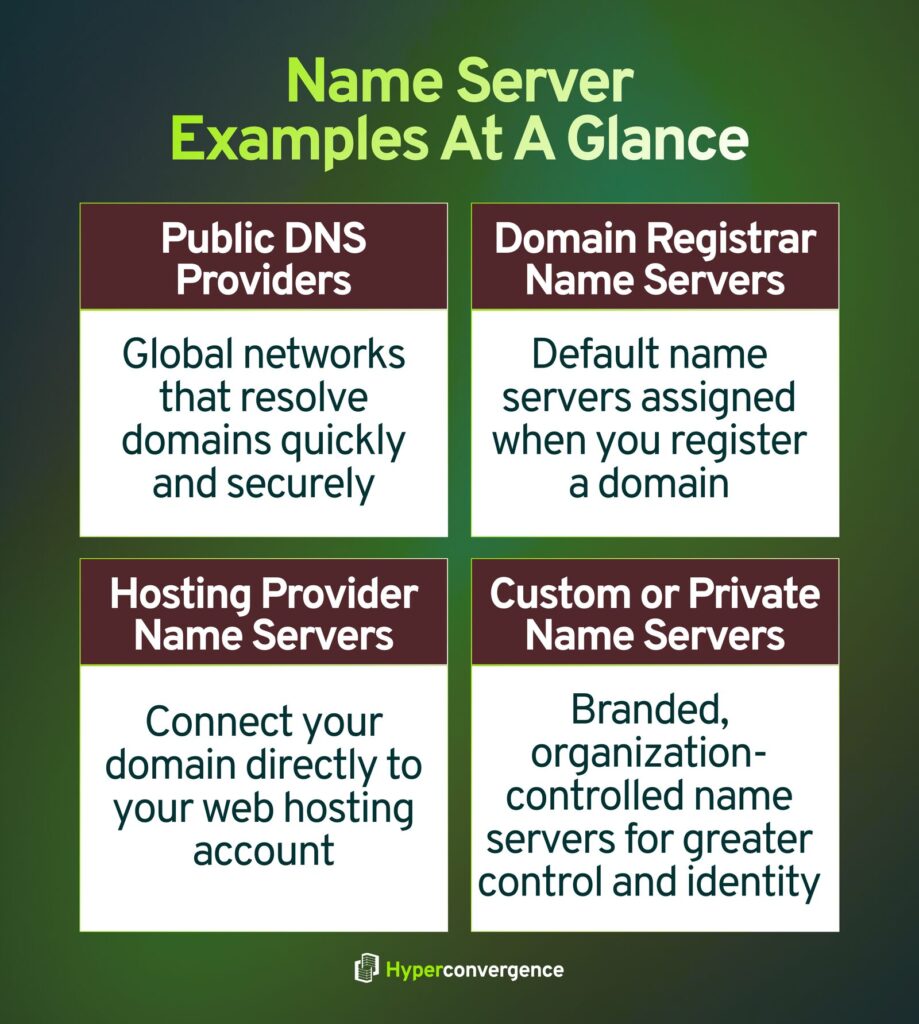
1. Public DNS Provider Name Servers
These globally distributed systems handle DNS resolution at scale and help direct users to the correct destinations efficiently.
- Cloudflare DNS
Example name servers:
lara.ns.cloudflare.com, mark.ns.cloudflare.com (source) - Google Public DNS
Resolver IPs often associated with Google DNS services:
8.8.8.8, 8.8.4.4 (source)
These providers operate large anycast networks designed for speed, reliability, and security.
2. Domain Registrar Name Servers
When you register a domain, registrars often assign default nameservers that manage DNS unless changed.
- GoDaddy
Example: ns01.domaincontrol.com, ns02.domaincontrol.com - Namecheap
Example: dns1.registrar-servers.com, dns2.registrar-servers.com
These name servers manage DNS records unless the domain owner switches to a third-party DNS provider.
3. Hosting Provider Name Servers
Web hosting platforms often provide name servers that link domains directly to hosting infrastructure:
- Bluehost
Example: ns1.bluehost.com, ns2.bluehost.com - HostGator
Example: ns1.hostgator.com, ns2.hostgator.com
In these setups, nameservers affect how quickly and accurately a domain connects to its hosting environment.
4. Custom or Private Name Servers
Enterprises and SaaS providers often use branded or private name servers, such as:
- ns1.companyname.com
- dns.companyinternal.net
These are typically backed by managed DNS platforms or internal DNS infrastructure for better control, branding, and redundancy.
Why These Examples Matter
These examples show that name servers are not abstract concepts. They are real, configurable systems that directly affect:
- Website accessibility
- Email delivery
- Application routing
Understanding which website’s nameservers are in use and where the domain’s nameservers located is the first step in managing DNS reliably.
Nameservers vs. DNS: Are They the Same?
No, nameservers and DNS are closely related, but they are different concepts.
DNS is the global domain name system that translates domain names into technical routing data like IP addresses. Name servers are specific servers within DNS that store and return DNS records for a domain.
DNS defines how resolution works. Name servers do the actual work by answering queries and returning the right IP address or other record data needed to reach services.
To visualize this relationship, imagine DNS as a network of directories and rules, and name servers as the actual libraries holding the entries. When a device needs to resolve a domain name, it interacts with DNS, and DNS directs that request to the appropriate name server for the answer.
At the top of this system are 13 logical root name server identities that help DNS resolvers find the correct authoritative name servers during the resolution process.
In short, DNS is the ecosystem; name servers are the working parts that make it function.
Here’s a quick comparison between these two:
| Aspect | DNS | Name Server |
| What it is | The global system that translates domain names into IP addresses | A specific server that stores DNS records and answers DNS queries |
| Scope | An entire internet-wide naming and resolution framework | A single component within the DNS system |
| Primary role | Defines how domain resolution works end-to-end | Provides authoritative answers for a domain |
| Data handled | Rules, hierarchy, and resolution process | DNS records such as A, MX, NS, and TXT |
| Example | The DNS hierarchy (root, TLD, authoritative layers) | ns1.example.com, ns.cloudflare.com |
| Dependency | DNS relies on name servers to function | Name servers operate as part of DNS |
How Do Name Servers Actually Work? (Step-by-Step DNS Resolution)
When you type a domain into the address bar, name servers work behind the scenes so your browser connects to the correct destination.
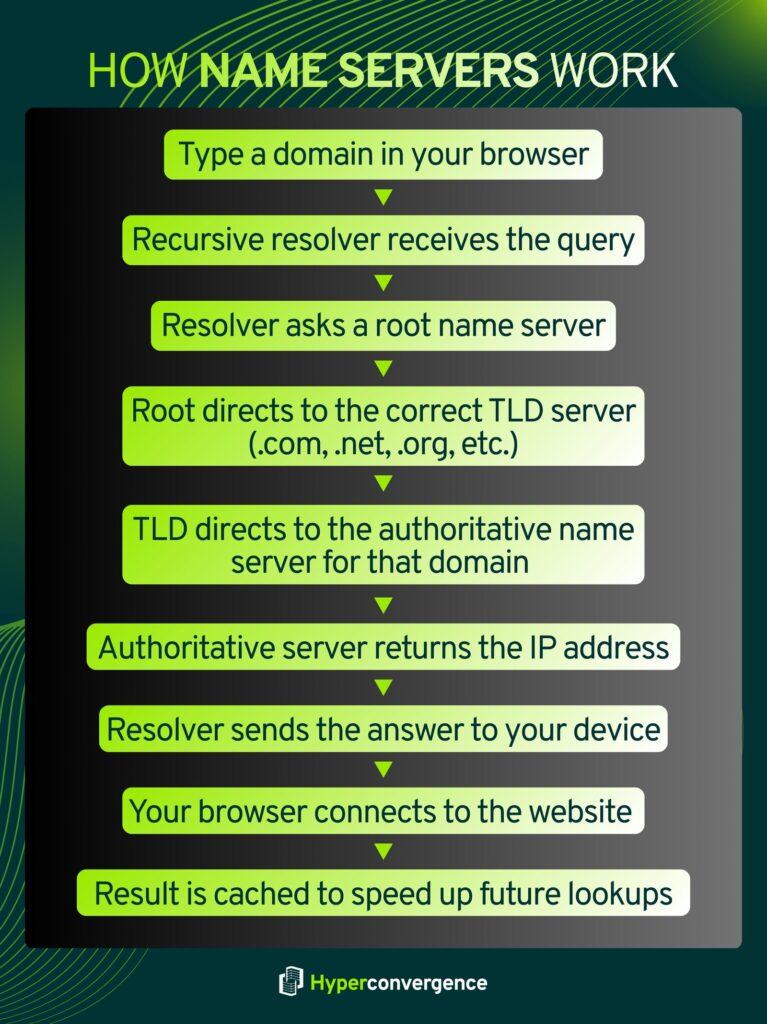
Here’s the DNS resolution path in simple steps:
- Your device asks a recursive resolver
This is usually provided by your ISP or a public DNS service (like Cloudflare or Google). It’s the first stop for your request. - The resolver asks a root name server
Root name servers don’t know specific addresses but guide the resolver to the next layer. - The root server points to a TLD server
For example, for example.com, the .com TLD server is the next target. - The TLD server points to the authoritative name server
This server holds the actual DNS records for the domain. - The authoritative server returns a specific DNS record
It sends back the IP address or other record needed to reach the destination. - The resolver caches and returns the result
Your device gets the final answer and connects to the website. The resolver often caches it, so future requests are faster.
The result is a mapping from a friendly name to a routable IP address that your system uses to make a connection.
Across the internet, this resolution happens relentlessly. In a recent authoritative DNS traffic report, UltraDNS handled an average of about 123.9 billion DNS queries per day, illustrating how frequently name servers are queried on major internet infrastructure.
What Do DNS Requests to Name Servers Look Like?
When a system contacts a name server, it sends a simple, structured question. The request asks for a specific type of information about a domain.
Common DNS request examples include:
- “What is the IP address for example.com?”
- “Which mail servers handle email for this domain?”
- “Is this domain an alias for another domain?”
Each request includes:
- The domain name
- The record type being requested (such as A, MX, or NS)
- A request for either cached or authoritative data
Name servers respond with a clear answer, no answer, or an error if the request cannot be resolved. This simplicity is what allows DNS to scale globally and respond quickly under heavy load.
DNS Records Stored & Served by Name Servers
Name servers store DNS records that describe how a domain behaves on the Internet. These records control where traffic goes and how services are reached.
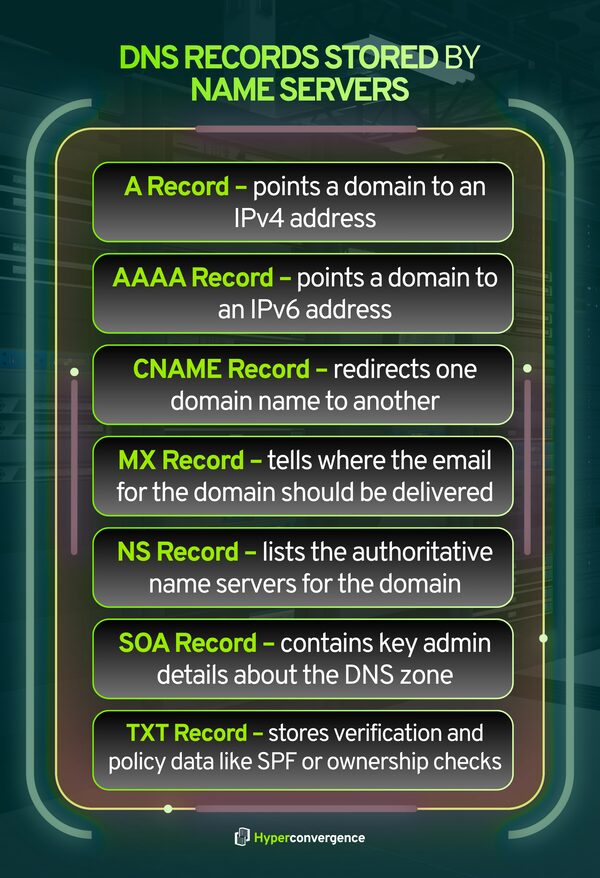
The most commonly used records include:
- A record – Translates a domain to its corresponding IPv4 address
- AAAA record – Maps a domain to an IPv6 address
- CNAME record – Points one domain name to another
- MX record – Defines where email for the domain should be delivered
- NS record – Lists the authoritative name servers for the domain
- SOA record – Contains administrative information about the DNS zone
- TXT record – Stores verification and policy data, such as SPF or domain ownership checks
Cloudflare documents that authoritative name servers respond with these records based on the domain’s configured zone data, forming the basis of internet routing and service discovery. (source)
Types of Name Servers and Their Roles
Not every name server does the same job. DNS works because different types of name servers handle different parts of the process, each with a clear responsibility. Together, they make domain resolution fast, reliable, and scalable.
Below is a simplified, practical breakdown of the main name server types you should know.
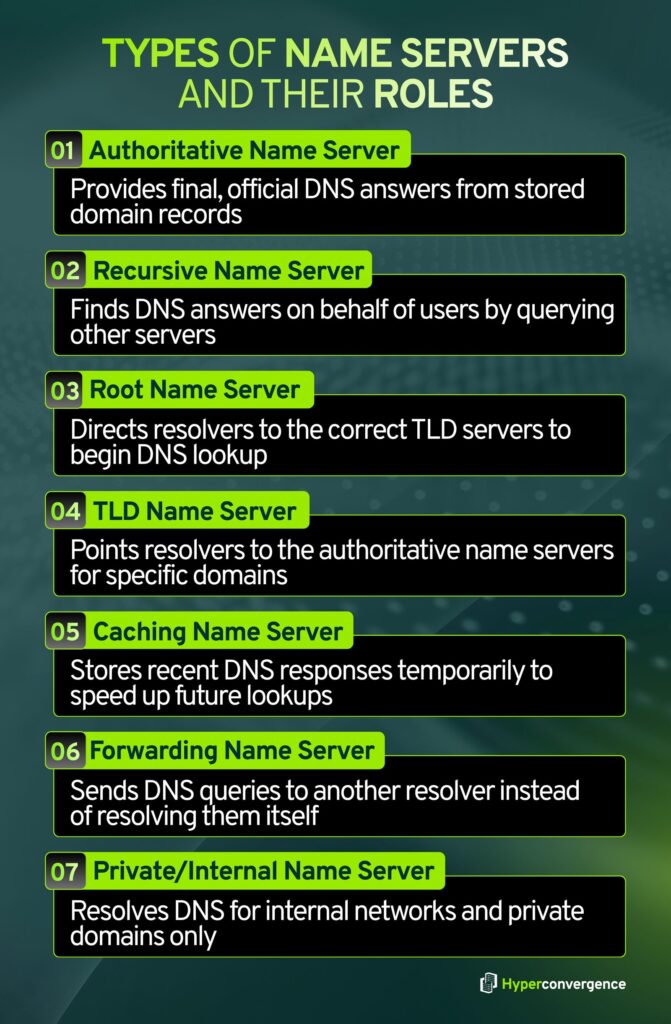
1. Authoritative Name Servers
Authoritative name servers are the final authority for a domain. They store the official DNS records and provide definitive answers.
What they do
- Store DNS records such as A, AAAA, MX, CNAME, NS, SOA, and TXT
- Answer DNS queries with authoritative responses
- Control where websites, email, and applications point
- Set TTL values that influence caching behavior
Why they matter
If authoritative name servers fail or return incorrect data, the domain becomes unreachable, even if the website or app is running.
2. Recursive Name Servers (Recursive Resolvers)
Recursive name servers act as helpers for users. They do the work of finding DNS answers, so individual devices do not have to.
What they do
- Receive DNS queries from browsers and applications
- Query root, TLD, and authoritative servers as needed
- Cache responses to speed up future requests
- Return the final result to the user
Why they matter
They reduce DNS lookup time and lower the load on authoritative servers through caching.
Cloudflare describes recursive DNS resolvers as systems that retrieve DNS data on behalf of clients.
3. Root Name Servers
Root name servers sit at the highest level of the DNS structure. They do not know domain IP addresses, but they know where to send resolvers next.
What they do
- Answer queries for the root zone (.)
- Points resolvers to the appropriate TLD name servers, such as .com or .org
- Enable DNS resolution to begin for any domain
Why they matter
Without root servers, DNS lookups could not start.
There are 13 logical root server identities, implemented through more than 1,500 server instances worldwide for resilience. (source)
4. TLD (Top-Level Domain) Name Servers
TLD name servers manage domains under specific extensions like .com, .net, or country codes such as .uk.
What they do
- Store delegation information for domains within a TLD
- Point resolvers to the correct authoritative name servers
- Act as the middle layer between the root and authoritative servers
Why they matter
They ensure DNS queries reach the correct domain owner’s name servers.
5. Caching Name Servers
Caching name servers temporarily store DNS answers based on TTL values.
What they do
- Save recent DNS responses
- Serve cached results without querying authoritative servers again
- Reduce lookup time and network traffic
Why they matter
Caching improves performance and helps DNS scale efficiently. In fact, caching is a core DNS mechanism that improves speed and reduces load.
6. Forwarding Name Servers
Forwarding name servers pass DNS queries to another resolver instead of resolving them directly.
What they do
- Forward DNS requests to upstream resolvers
- Centralize DNS policy and filtering
- Simplify DNS management in enterprise networks
Why they matter
They are commonly used in corporate environments to control and monitor DNS traffic. Microsoft documents DNS forwarding as a standard enterprise practice.
7. Private or Internal Name Servers
Private name servers operate inside organizations or cloud environments and are not publicly accessible.
What they do
- Resolve internal domain names
- Support private applications and services
- Enable split-horizon DNS setups
Why they matter
They keep internal systems isolated from public DNS and improve security and control.
How These Roles Fit Together
Each type of name server plays a specific role, but they function as a coordinated system:
- Recursive resolvers handle user queries
- Root and TLD servers guide resolution
- Authoritative servers provide final answers
- Caching improves speed and efficiency
- Forwarders and private servers support enterprise control
This division of responsibility is what allows DNS and name servers to operate reliably at a global scale.
Why Name Servers Matter for Websites, Emails, & Applications
Name servers sit at the entry point of nearly every online interaction. Before users can access websites, an email is delivered, or an application connects to an API, DNS resolution has to succeed. If name servers fail, everything behind them effectively disappears, even if the underlying systems are healthy.
Websites
For websites, name servers determine whether users can reach your domain at all.
- Browsers rely on name servers to translate domain names into IP addresses.
- A name server outage makes a website unreachable, regardless of server uptime.
- Slow DNS responses increase page load time and degrade user experience.
Email delivery depends heavily on name servers through MX records.
- Mail servers use DNS to find where messages should be delivered.
- Incorrect or unavailable name servers can cause email delays, bounces, or silent failures.
- Security records like SPF, DKIM, and DMARC are also stored in DNS and validated during delivery.
Google notes that properly configured DNS records are essential for reliable email delivery and authentication. (source)
Applications and APIs
Modern applications rely on DNS for service discovery and connectivity.
- APIs, microservices, and cloud workloads use DNS names rather than fixed IPs.
- DNS enables load balancing, failover, and regional routing.
- Internal applications often depend on private name servers for service resolution.
In fact, the DNS infrastructure supports over 368 million registered domain names worldwide, making it one of the most heavily relied-on systems in global application delivery.
Why This Matters in Practice
Because name servers operate before any application logic runs:
- A DNS issue looks like a full outage to users.
- Misconfigurations affect multiple services at once.
- Reliability and security at the name server layer directly impact business continuity.
In short, name servers are not just a networking detail. They are a foundational dependency for websites, email systems, and applications across the internet.
How Are Name Servers Assigned to a Domain?
When you register a domain:
- Your registrar assigns default name servers
- Or you choose your own DNS provider
- Or you configure private, custom name servers
The name servers listed at your domain registrar determine who controls your DNS records.
Changing name servers does not move your website hosting automatically; it just changes who answers DNS questions about your domain.
How to Find Your Domain’s Name Servers
You can quickly check which name servers your domain is using through a few simple methods, and all of them return the same core information: the authoritative NS records for your domain.
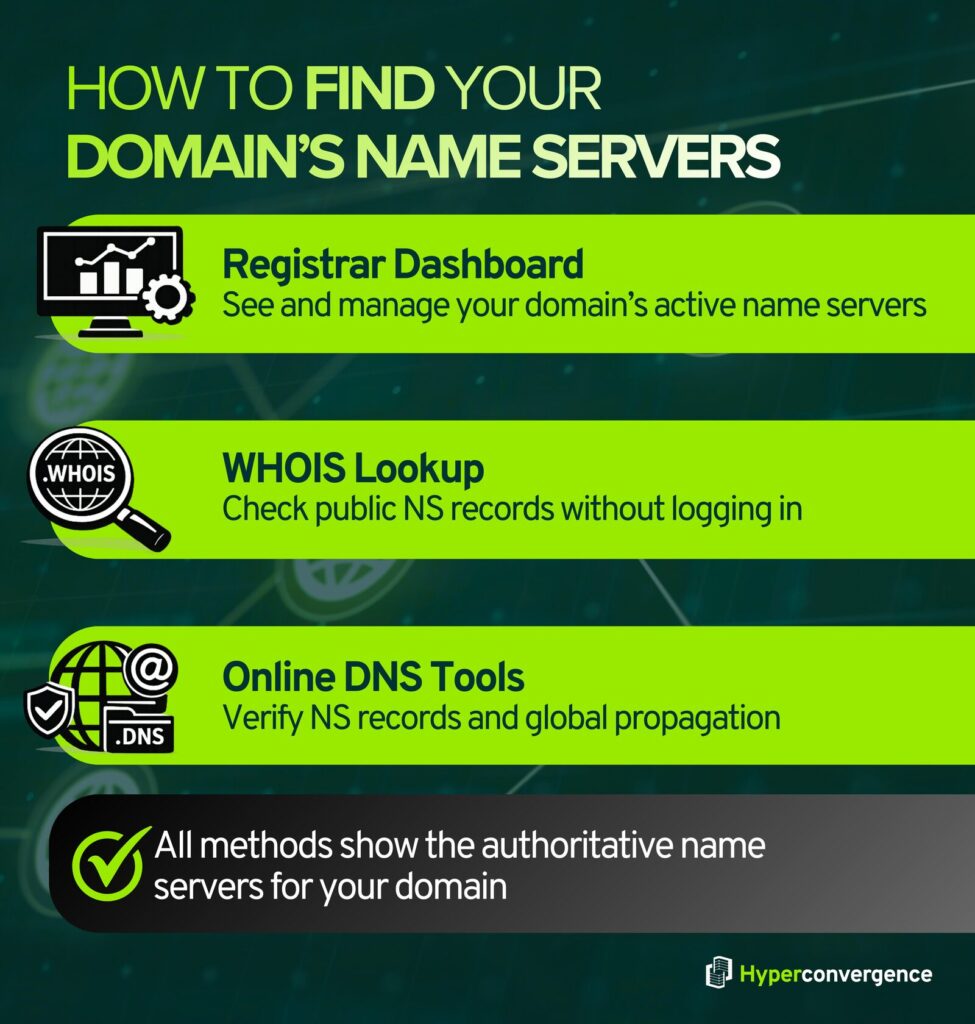
1. Registrar Dashboard
The most direct method is your domain registrar account (such as GoDaddy, Namecheap, Google Domains, etc.). After logging in, open the DNS Management or Name Servers section for your domain. This page lists the active name servers, and if needed, you can also update or replace them here.
2. WHOIS Lookup
WHOIS databases store public domain registration details. By entering your domain into any WHOIS lookup tool, you will see ownership data along with the current name server entries. This is useful when you don’t have access to the registrar account but still want to verify DNS settings.
3. Online DNS Lookup Tools
DNS checker tools provide a more technical view. They show your NS records, overall DNS health, and global propagation status across multiple geographic locations. These tools can help confirm whether recent DNS changes have propagated worldwide.
Using any of these methods ensures you know exactly which provider controls your DNS, an essential step when troubleshooting outages, moving hosting, or configuring email services.
How to Use Name Servers in the Real World
Most users interact with DNS through settings rather than commands.
Typical tasks include:
- Connecting a new domain to hosting
- Pointing email to Microsoft 365 or Google Workspace
- Moving DNS to Cloudflare or another provider
- Changing registrar or hosting providers
In each case, you usually:
- Update your name servers at your registrar
- Manage DNS records at your DNS provider
- Wait for changes to propagate
Managing Name Servers
Name server management is about making sure your domain always points to the right hosting, email, or application services. Whether you’re moving to a new hosting provider, creating white-label DNS for clients, or simply correcting a misconfiguration, changes must be handled carefully to avoid downtime.
The steps below show how to set up, customize, and safely update name servers:
How to Set Up a Name Server
This applies when you connect a domain to a hosting provider.
- Choose your DNS provider or hosting service
Common examples include Cloudflare, cPanel hosting, or managed WordPress hosts. - Locate the provider’s name server addresses
These usually look like: ns1.example.com and ns2.example.com. - Log in to your domain registrar
Open the DNS or Name Servers section for your domain. - Replace existing entries with the new name servers
Enter both (or more) name server records exactly as provided. - Save changes and wait for propagation
It typically takes minutes to 24–48 hours for full global propagation.
Your domain will now resolve via the new DNS provider.
How to Set Up a Custom Name Server
A custom name server is a branded hostname like ns1.yourdomain.com. This is common for hosting companies, agencies, and some enterprise environments.
- Decide where authoritative DNS will run
- A custom name server name still needs real DNS infrastructure behind it. This can be self-hosted or backed by a managed DNS platform.
- Create the name server hostnames at your registrar
- In the registrar portal, look for “Register Nameserver,” “Host Names,” or “Child Nameservers.”
- Create entries such as:
- ns1.yourdomain.com → your authoritative DNS server IP
- ns2.yourdomain.com → your authoritative DNS server IP
- Add glue records if required
- If the name servers live inside the same domain they serve, glue records are required so resolvers can find them without circular lookups.
- Registrars typically handle glue as part of the child nameserver setup.
- Point the domain to the custom name servers
- Set the domain’s name servers to ns1.yourdomain.com and ns2.yourdomain.com in the registrar name server settings.
- Confirm the zone is answering
- Query your new name servers directly to confirm they return correct A, CNAME, MX, and TXT records.
How Do I Update My Name Servers Safely?
Name server changes are high-impact. The safest approach treats the change like a cutover.
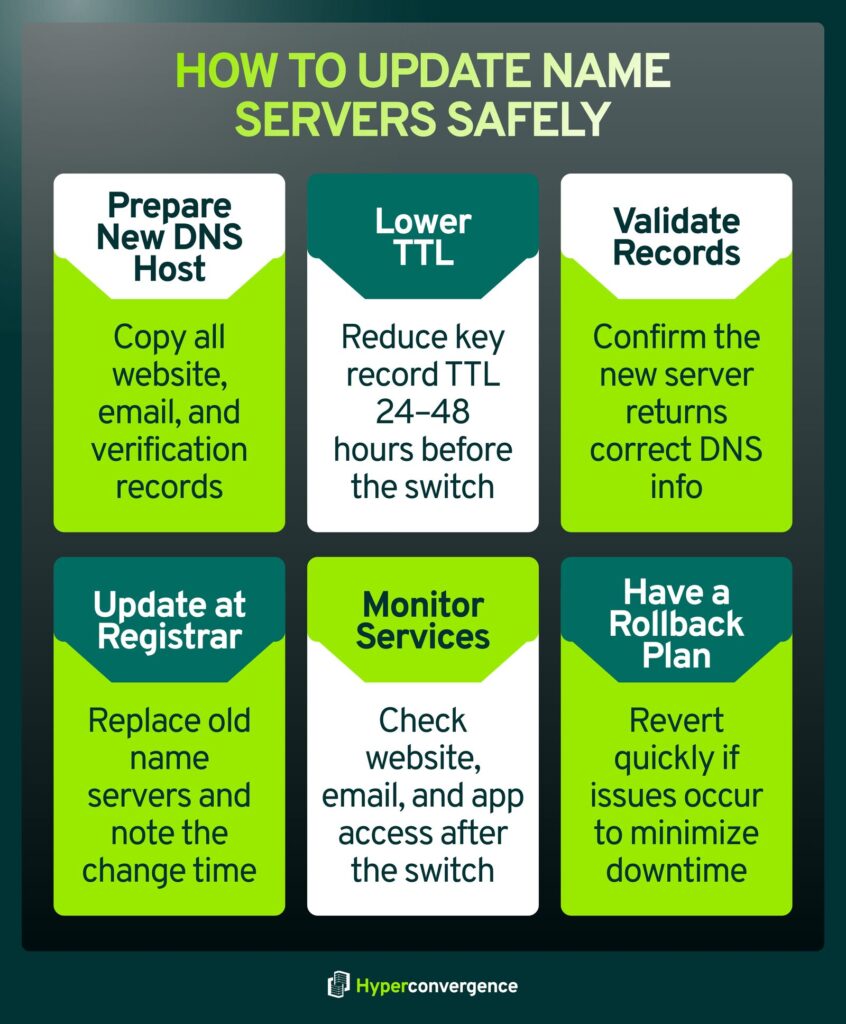
- Prepare the new DNS host first
- Copy every record from the current DNS host to the new one.
- Pay close attention to:
- Website records (A, AAAA, CNAME)
- Email records (MX, SPF TXT, DKIM, DMARC)
- Verification of TXT records used by services
2. Lower TTL values ahead of time
- Reduce TTL on key records 24 to 48 hours before the switch if you can.
- This reduces how long old answers stay cached.
3. Validate before changing anything
- Use a DNS lookup tool to confirm the new provider returns the correct records.
- If possible, query the new authoritative name servers directly.
4. Change name servers at the registrar
- Replace the old name servers with the new ones.
- Save changes and document the exact time of the update.
5. Monitor website and email after the switch
Check:
- Website access from multiple networks
- Email delivery and authentication status
- Key application endpoints
6. Keep a rollback plan
- If something breaks, revert to the prior name servers while you correct the new DNS zone.
- Rollback is often faster than trying to fix records during a live incident.
This approach reduces downtime risk and avoids the most common DNS mistakes, especially missing email records and incomplete zone copies.
How to Check Nameservers on Different Operating Systems
You can check which name servers a domain is using directly from your computer. Each operating system includes simple tools that query DNS and return authoritative information.
Windows
On Windows, open Command Prompt and use nslookup. This command asks DNS which name servers are responsible for a domain and shows the results in plain text. It is useful for quick checks without extra setup.
macOS
On macOS, open Terminal and use dig or nslookup. These tools provide more detailed output and are commonly used to verify name servers and DNS records during troubleshooting.
Linux
Linux systems support dig, nslookup, and host. These commands are widely used in server environments to confirm DNS delegation and validate name server responses.
All of these tools query DNS directly and show the authoritative name servers currently assigned to a domain
Why Are Name Servers Important? Key Benefits
Name servers play a central role in how the internet functions. They are not just a technical requirement, but a foundational layer that affects availability, performance, and security.
1. Enable Website and Service Accessibility
Name servers translate domain names into the information that systems need to connect. If name servers fail, websites, email, and applications become unreachable, even when servers are running normally.
2. Support Global Traffic Routing
Name servers help route users to the correct locations by directing traffic to the appropriate servers. This allows services to operate across regions and serve users from the nearest or most suitable endpoint.
3. Improve Performance Through Caching
By allowing DNS responses to be cached, name servers reduce lookup time and network overhead. This speeds up connections and lowers repeated DNS traffic.
4. Provide Resilience Through Redundancy
Domains typically rely on multiple name servers. If one becomes unavailable, others continue answering requests, helping maintain service continuity.
5. Act as a Control Point for Security Policies
Name servers store records that support security controls such as email authentication and DNS validation. They also act as an early enforcement point for access and routing decisions.
6. Simplify Infrastructure Changes
Name servers allow services to move or scale without changing domain names. Updates can be made at the DNS layer while applications continue operating normally.
Together, these benefits make name servers essential for reliable and flexible internet operations.
Benefits of Using Private/Custom Nameservers
Organizations choose private name servers because they offer practical control and stronger branding:
- Enhance brand identity: domains resolve through your branded NS (e.g., ns1.yourcompany.com), reinforcing trust and professionalism.
- Centralize DNS control: manage all client or internal domains from one platform instead of multiple third-party dashboards.
- Customize security and DNS policies: apply your own rules for TTLs, failover, logging, access, and monitoring.
- Integrate with internal tools: connect DNS directly with billing, automation, provisioning, or DevOps systems.
- Meet regulatory and compliance requirements: keep DNS data under your organization’s control when required by policy.
They are especially popular for managed hosting providers, SaaS platforms, and large enterprises that manage many domains and need consistency.
Name Servers Security: DNSSEC, DDoS Protection, and Risk Management
Name server security is not just a technical add-on; it is essential to keeping websites, email, and applications reachable and trustworthy. When DNS is attacked or misconfigured, users may be unable to access services, or worse, may be silently redirected to malicious destinations. The three pillars below: DNSSEC, DDoS protection, and basic operational safeguards- form the core security practices that protect modern domains.
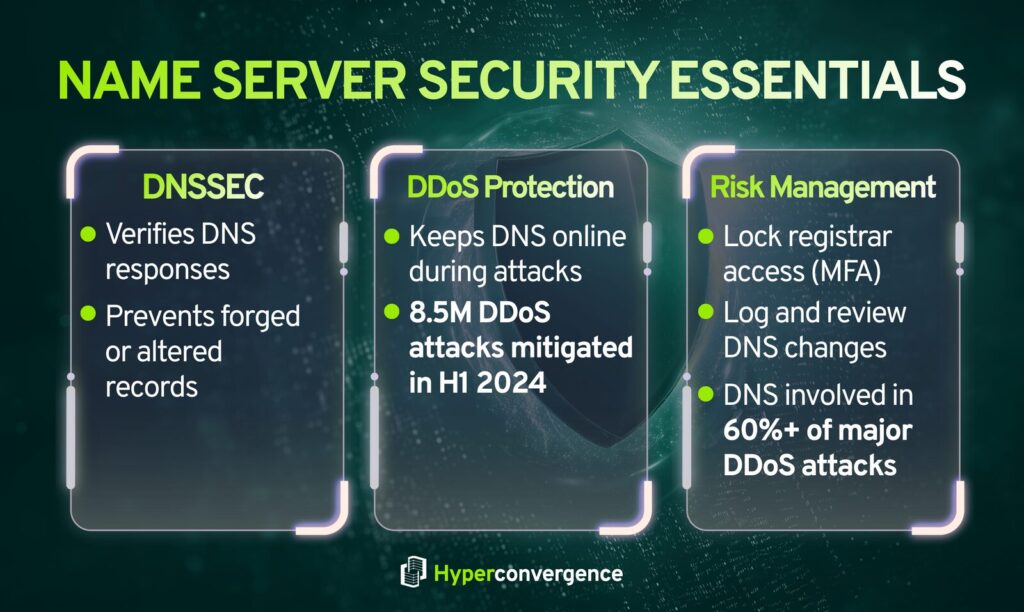
DNSSEC (DNS Security Extensions)
- What it is: DNSSEC adds digital signatures to DNS records so resolvers can verify that a response is authentic and has not been altered in transit.
- Why it’s bad when missing: Without DNSSEC, attackers can sometimes try to trick resolvers into accepting forged DNS answers, which can redirect users to the wrong destination.
- How to stop it: Enable DNSSEC at your DNS provider, publish the required DS record at your registrar, and monitor for signing or validation errors after changes.
DDoS Protection (DNS and Network Flooding)
- What it is: DDoS attacks overwhelm DNS or supporting network infrastructure to slow down or take domains offline.
- Why it’s bad: If authoritative DNS becomes unreachable, users cannot resolve your domain, so websites, email, and apps appear down. Cloudflare reported mitigating 8.5 million DDoS attacks in the first half of 2024.
- How to stop it: Use an authoritative DNS provider with anycast capacity and integrated DDoS mitigation, deploy redundant name servers across regions or providers, and continuously monitor query rates and failure codes.
Additional Risk-Management Basics That Prevent Real Outages
- Lock down the registrar account: Enforce MFA, restrict access, and use registrar or registry lock features where available to reduce the risk of unauthorized NS changes.
- Treat DNS like production infrastructure: Require change logging, peer review for edits, and routine audits of NS, MX, and critical records. This reduces “small DNS mistake, big outage” incidents.
- Assume DNS is part of DDoS campaigns: More than 60% of the DDoS attacks mitigated in Q1, Q3, and Q4 2024 had a DNS component, which is a practical reason to harden DNS even if your main app stack is well protected.
Enterprise & Cloud Consideration
Enterprise and cloud environments have unique demands on DNS and name servers. Here are the key findings infrastructure leaders should know:
- Cloud-First Adoption: Over 60 % of authoritative DNS deployments are now cloud-based, reflecting enterprise preference for scalable, centrally managed DNS services that support dynamic workloads and hybrid architectures.
- Hybrid & Multi-Cloud Complexity: As organizations spread workloads across AWS, Azure, Google Cloud, and on-premises systems, DNS must ensure consistent resolution across environments. Centralizing DNS management helps avoid configuration drift and outages.
- Performance & Failover: Cloud-based DNS platforms typically use global anycast networks, reducing latency and improving reliability by routing queries to the nearest available server. This supports seamless failover during regional outages.
- Security & Visibility: Hybrid and cloud models can reduce visibility into DNS traffic, which 71% of enterprises cite as a challenge in hybrid cloud environments, underscoring the need for integrated DNS monitoring and policy controls.
- Enterprise Scale Support: Enterprises benefit from automation, API-driven DNS updates, and integration with CI/CD pipelines, enabling DNS to keep pace with rapid infrastructure changes and application deployment cycles.
These points highlight that the DNS strategy in enterprise and cloud deployments is not merely a network concern but a core architectural consideration for performance, resilience, and security.
Common Name Server Issues & Troubleshooting
Most name server issues follow a small set of repeatable patterns. Understanding these patterns makes it easier to isolate the root cause and restore resolution quickly.
NXDOMAIN (Domain Not Found)
- What it means: DNS cannot find the requested domain or hostname.
- Common causes:
- Typographical errors in records
- Missing A, AAAA, or CNAME records
- Domain not properly delegated at the registrar
- Recently created records not yet visible
- How to fix:
- Verify records exist on the authoritative name server
- Confirm correct NS delegation at the registrar
- Recheck spelling and record names
SERVFAIL (Server Failure)
- What it means: The resolver could not obtain a valid response from authoritative DNS.
- Common causes:
- DNSSEC validation failures
- Broken or incomplete delegation
- Authoritative name server misconfiguration
- How to fix:
- Validate DNSSEC signatures and key chains
- Confirm authoritative servers are reachable and responding correctly
Google Public DNS notes that DNSSEC failures frequently surface as SERVFAIL responses.
DNSSEC Errors After a DNS Provider Change
- What happens: Domains return SERVFAIL even though records appear correct.
- Root cause:
- A DS record remains at the parent zone while the new DNS provider is not serving matching DNSSEC keys.
- A DS record remains at the parent zone while the new DNS provider is not serving matching DNSSEC keys.
- How to fix:
- Remove the DS record before migration or re-enable DNSSEC correctly on the new provider
Changes Not Taking Effect (“It Still Points to the Old Place”)
- What it means: DNS caches are still serving old data.
- Why it happens:
- DNS responses remain cached until the TTL expires
- Negative responses (such as NXDOMAIN) are also cached
- How to fix:
- Wait for TTL expiration
- Lower TTL values ahead of planned changes
Negative caching behavior is defined in RFC 2308.
Practical Troubleshooting Checklist
- Confirm NS records at the registrar
- Verify records exist on the authoritative name servers
- Test using dig or nslookup against authoritative servers
- Re-test after TTL expiration using external lookup tools
Most DNS issues are configuration-related rather than infrastructure failures. A structured approach and authoritative verification tools usually resolve problems quickly and safely.
FAQs
You use nameservers by assigning them to your domain through your registrar’s nameserver settings. This tells the Domain Name System which DNS provider is responsible for your domain. Once set, nameservers ensure your site, email, and other services point to the correct infrastructure so users can access websites without knowing IP addresses.
Log in to your domain registrar, open the domain management area, and look for the manage button next to your domain. On the right page, replace the existing entries with your new nameservers and save. This updates how the domain routes traffic to your hosting provider and related services.
Nameserver changes typically take 24 to 48 hours to propagate globally. During this time, DNS caches may still return old data. Propagation speed depends on TTL values and resolver caching behavior, which can affect website speed and accessibility temporarily during the transition.
You can check nameservers through your registrar’s dashboard, a WHOIS lookup tool, or by running a DNS query using the following command: nslookup -type=NS yourdomain.com. This shows which authoritative servers handle server queries for your domain and confirm where DNS is managed.
A name server is used to direct users and applications to the right IP address for a domain. When someone types a URL into the address bar, name servers help the browser connect to the correct server that hosts your website content or related services like email.
DNS is the entire domain name system that translates domain names into IP addresses. A name server (NS server) is one component of DNS. It stores DNS records and answers queries, while DNS refers to the full global system that coordinates how nameservers work together.
8.8.8.8 is Google Public DNS, a recursive DNS resolver, not an authoritative nameserver for a specific domain. It helps resolve domains by querying authoritative name servers on your behalf. Many users rely on it to access websites, improve reliability, and handle mail exchange and web lookups efficiently.

Tamzid is a distinguished SEO writer with over six years of experience specializing in IT, technology, data centers, and cybersecurity. His expertise extends to hyperconverged infrastructure, where he delivers well-researched, high-ranking content that bridges technical accuracy with reader clarity. With a deep understanding of both search optimization strategies and advanced IT concepts, Tamzid produces authoritative material that engages industry professionals and decision-makers alike.