Private Cloud vs Public Cloud: 10 Key Differences
The global public cloud market is expected to reach $723 billion by 2025, growing by over 20% annually, as businesses demand agility, scalability, and a variety of new services.
In the meantime, private cloud deployments are soaring, with the market estimated at US$132 billion and rising quickly as firms seek control, compliance, and cost predictability. Many organizations are also evaluating the top cloud servers to find flexible hybrid options that bridge both models.
The dual surge raises a crucial question for IT leaders: should your next infrastructure shift be in the public cloud, private cloud, or somewhere in between?
In this guide, we’ll compare private cloud vs public cloud across 10 key dimensions, highlight their use-cases, deploy decision tools, and help you pick the right path for your organization’s strategy now and into the future.
So, let’s dive in!
What Is a Public Cloud?
A public cloud is a computing model where a third-party provider owns, manages, and delivers infrastructure- servers, storage, networking, and applications over the internet.
In this model, users access resources on demand, using a pay-as-you-go structure, and share infrastructure in a multi-tenant setting.
Public cloud environments excel when speed, scale, and flexible cost structure matter. Organisations that wish to avoid upfront hardware investment and need global reach often opt for them.
With a public cloud, you can leave infrastructure maintenance to the provider and focus instead on using services. As a result, many web apps, startups, and variable workloads find the public cloud a compelling option.
Public Cloud Advantages
Here are the key benefits of using a public cloud for your business or organization:
- On-Demand Scalability: Instantly add or remove capacity to match traffic spikes or seasonal demand without buying hardware. This elasticity is a core public cloud benefit.
- Lower Upfront Cost / Pay-As-You-Go: No large capital expenditure for servers; you pay for what you use, which helps startups and projects with uncertain demand.
- Speed of Innovation: Cloud providers publish new services (managed databases, AI/ML tools, analytics) frequently, letting teams build faster without long procurement cycles.
- Global Reach & Resiliency: Major public clouds have many regions and availability zones, which help with redundancy, failover, and low-latency access for distributed users.
- Managed Operations & Security Services: Providers handle hardware maintenance, physical security, and offer built-in security tools (IAM, encryption, monitoring), shifting operational burden to the vendor.
- Rich Ecosystem & Integrations: A wide range of third-party tools, partners’ solutions, and vendor-managed services accelerates development and reduces integration work.
Disadvantages of Public Cloud
While saying yes to a public cloud setup, these are the main challenges you should keep in mind:
- Variable and Sometimes Unpredictable Costs: Pay-as-you-go is flexible but can lead to surprise bills (egress fees, storage overages, heavy API or data transfer charges) without careful cost monitoring.
- Vendor Lock-in Risk: Moving large workloads between providers is nontrivial; different APIs, managed services, and data formats can make migrations costly and slow.
- Data Residency & Compliance Concerns: For regulated industries, keeping data under specific jurisdictional control can be harder in a pure public cloud model.
- Limited Control & Customisation: You can’t change the underlying hardware or deeply customise the provider’s multi-tenant stack the way you can with private infrastructure.
- Performance Variability & Latency: Shared infrastructure and network paths may introduce unpredictable latency or noisy-neighbor effects for very latency-sensitive apps.
- Dependency on Internet Connectivity: Outages or limited bandwidth at the customer end can disrupt access to services hosted in the public cloud environments.

Common Use Cases
Public cloud deployments power modern businesses with speed, scalability, and minimal infrastructure investment. Leading public cloud providers like AWS, Azure, and Google Cloud offer flexible public cloud services that support diverse workloads, such as:
- Web and Mobile Applications: Startups and digital businesses launch apps using public cloud computing resources, scaling instantly to meet user demand.
- Data Storage and Backup: Organizations rely on public cloud infrastructure for secure, cost-efficient storage and disaster recovery, with built-in redundancy and encryption.
- Development and Testing: Developers spin up virtual environments quickly using public cloud vendors, enabling agile workflows and faster release cycles.
- Analytics and AI/ML: Public clouds provide high-performance computing and pre-built AI tools to process large datasets efficiently.
- Content Delivery and Collaboration: Media, e-commerce, and remote teams leverage global networks and public cloud services for streaming, collaboration, and business continuity.
In short, public cloud deployments remain the backbone for agile, innovative, and scalable digital operations.
Public Cloud Real World Examples
Here are some real‑world examples of public cloud use that illustrate how major organisations benefit from these environments:
- Netflix uses AWS to handle massive global streaming scale: its workloads, including compute, storage, and analytics , run across thousands of servers worldwide. (source)
- BMW Group adopted a public cloud‑first strategy, using both AWS and Microsoft Azure to modernise its IT, migrate critical applications, and scale support for 450 million daily data requests.
- Spotify (as noted in academic comparison) uses public cloud computing to power real‑time analytics and recommendation services across millions of users, leveraging the infrastructure and managed services of major cloud vendors. (source)
These real-life examples demonstrate how leading organisations rely on public cloud infrastructure, services, and vendors to scale, innovate, and deliver at a global level.
What Is a Private Cloud?
A private cloud is a cloud computing environment dedicated to one single organization– not shared with anyone else. Unlike public clouds, where multiple customers share the same infrastructure, private clouds offer a secure environment with complete control over data, networking, and resource configuration.
Private cloud computing can be built in your organization’s own data center or hosted by a third-party provider, but in both cases, only private cloud users have access to the resources.
This makes it ideal for private organizations that handle sensitive workloads, require strict compliance (like banking, healthcare, or government), or need custom configurations that are not possible in a shared public environment.
In short: If security, data governance, and customization are top priorities, a private cloud is the environment designed for you, built for control, optimized for protection.
Advantages of Private Cloud Model
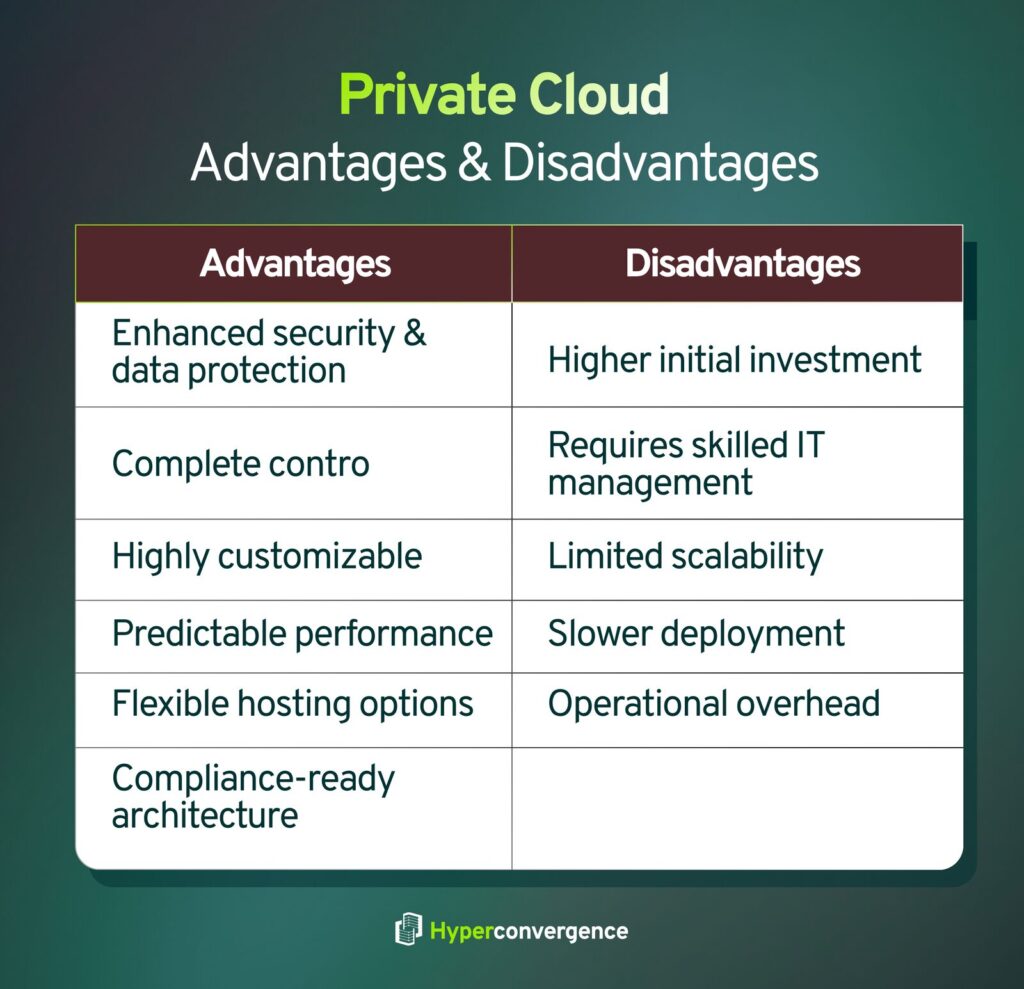
A private cloud model gives organizations a dedicated cloud environment with full control over how resources are configured, accessed, and secured. Whether built on on-premises infrastructure or delivered through hosted private clouds, here are the top benefits:
- Enhanced Security & Data Protection: As the infrastructure is dedicated to one organisation, private cloud users operate in a more secure environment. Sensitive data doesn’t mix with other tenants, reducing risks of breaches and unauthorized access. Perfect for industries that can’t compromise on data security- like finance, healthcare, and government.
- Complete Control Over Infrastructure: Opposite to public cloud models, where the provider decides most configurations, a private cloud gives IT teams complete control over networking, storage, hardware, and access policies. You can design your underlying infrastructure exactly as your business requires.
- Customisation for Sensitive Workloads: Being designed around your needs, private cloud environments can be tailored to high-performance apps, regulated data, or systems with strict governance. Ideal for sensitive workloads where precision and compliance matter more than cost savings.
- Predictable Performance: Resources aren’t shared with other companies- therefore, no “noisy neighbour” issues. A dedicated cloud environment means consistent performance for critical workloads like ERP systems or analytics engines.
- Flexible Hosting Options: Private cloud computing can be built in your own data center or managed by a third-party service provider (also known as a virtual private cloud or managed private cloud). Same privacy benefits, without the maintenance burden.
- Compliance-Ready Architecture: Private cloud services simplify regulatory compliance (HIPAA, GDPR, PCI-DSS) because everything- infrastructure, data, access, etc stays under your policies. Your data stays where you need it: on-site or in a controlled environment.
Disadvantages of Private Cloud
While private clouds offer strong protection and control, they also come with responsibilities and cost considerations:
- Higher Initial Investment: Building or maintaining private cloud infrastructure (hardware, data centers, IT staff) requires upfront costs. This is what it looks like:
- Public cloud = rent
- Private cloud = own
- Requires Skilled IT Management: Private clouds need internal expertise to manage updates, virtualization, security, and capacity planning, unless using a managed private cloud solution. And more control also means more responsibility.
- Limited Scalability (Compared to Public Cloud): Scaling capacity often means purchasing additional servers or storage. And you can interpret the entire cloud environment as follows:
- Public cloud = infinite resources
- Private cloud = limited to what’s physically available
- Slower Deployment of New Services: Public clouds innovate at lightning speed with new cloud technology releases. Private clouds don’t update as quickly because you control the underlying infrastructure. Here, you get stability, not rapid experimentation.
- Operational Overhead: Even when using hosted private clouds, organizations are still responsible for budgeting, capacity, backups, and performance.
In short, private clouds shine where security and control outweigh speed and elasticity, while public clouds win when flexibility and cost-efficiency are the priority.
Common Use Cases
Private cloud environments are ideal when businesses need tighter governance, high security, and predictable performance. Unlike public clouds, where resources are shared, private cloud environments are powered by a dedicated cloud infrastructure, making them a strong fit for regulated and performance-sensitive scenarios.
Here are the most common use cases for private cloud computing:
- Regulated Industries (Finance, Healthcare, Government): Banks, hospitals, telecom operators, and government bodies rely on private clouds to meet strict data residency and compliance requirements (HIPAA, PCI-DSS, GDPR).
According to IBM, healthcare and financial institutions are among the highest adopters of private cloud due to strict compliance and sensitive data handling.
- Business-Critical & Sensitive Workloads: Workloads that require low latency, reliability, and high data integrity, such as ERP systems, manufacturing automation, and core banking applications, are often placed in private clouds.
- Data Sovereignty/ Data Residency Requirements: Organizations operating across borders use private cloud models to keep data within a specific geographical location.
- Hybrid or Multi-Cloud Strategy: Private clouds often act as the “control center” in hybrid cloud setups, where sensitive workloads stay in a private cloud while scalable workloads run in the public cloud.
- Virtual Private Cloud (Hosted Private Cloud): Organizations that want private cloud benefits without managing hardware use managed private cloud or virtual private cloud options hosted by a third-party service provider.
In short, private cloud deployments fit businesses that can’t compromise on data security, compliance, and control.
Real World Examples
Here are real-world companies using private cloud environments, and what they achieved with them:
- Bank of America: The bank migrated around 200,000 servers and 60 data‑centres down to approximately 70,000 servers and 23 data‑centres as part of its internally‑hosted private cloud strategy. (source)
- NASA (Project Nebula): NASA’s Ames Research Center developed “Nebula”, a private cloud platform built in‑house using containerized infrastructure and open‑source cloud frameworks. It provided high‑capacity computing and storage services for mission‑critical workloads in a self‑managed environment. (source)
- Walmart: Walmart Labs runs a massive private (and hybrid) cloud stack based on OpenStack. By 2017, the company had surpassed 100,000 cores internally and progressed toward over one million CPU cores in its internal cloud infrastructure.
Private vs Public Cloud: The Similarities
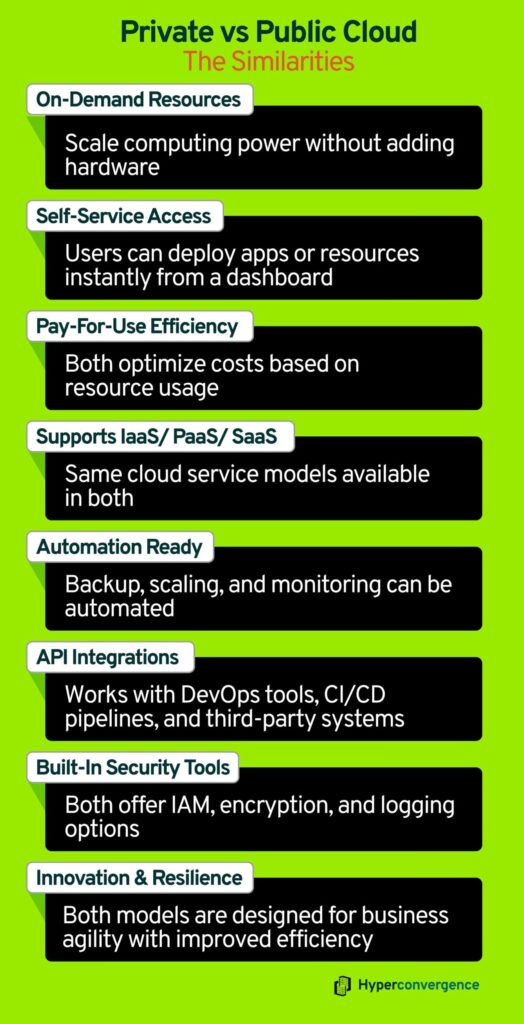
Key similarities between public and private clouds include the following:
1. Virtualization and On-Demand Resources
Both private and public clouds rely on virtualization technologies to pool and allocate computing resources dynamically. Users can scale workloads up or down without physically provisioning servers, improving operational efficiency.
2. Self-Service Access
Whether it’s a public cloud portal or a private cloud dashboard, users in both models can provision compute, storage, and networking resources on demand. This self-service capability accelerates application deployment and reduces dependence on IT teams.
3. Pay-Per-Use Economics
Although billing structures differ, both clouds aim to optimize resource utilization. Private clouds often track internal consumption for chargeback purposes, while public clouds provide pay-as-you-go pricing, ensuring cost efficiency relative to usage.
4. Service Models (IaaS / PaaS / SaaS compatibility)
Both private and public clouds can deliver the same service layers (IaaS, PaaS, SaaS). Organizations can run virtual machines, platform services, or SaaS apps regardless of whether the underlying cloud is public or private.
5. Automation and Orchestration
Both deployment models support automated resource management, orchestration, and monitoring tools. Tasks like load balancing, backups, and updates can be scheduled and managed efficiently, reducing human intervention and operational errors.
6. API-Driven Integrations
APIs and standardized interfaces are central to both models, allowing monitoring, autoscaling, CI/CD pipelines, and third-party integrations. This interoperability is what makes modern automation and DevOps possible across cloud environments.
7. Security Controls & Compliance Capabilities
While implementation differs, both cloud types offer security features: access control, encryption, logging, network segmentation, and can be configured to meet regulatory requirements when properly governed.
8. Business Goals: Agility, Efficiency, Resilience
At a strategic level, both private and public clouds exist to improve business outcomes: speed up delivery, increase infrastructure efficiency, and raise operational resilience. The tradeoffs (control vs. scale) determine which model best serves a specific need, but the core business drivers are the same.
Private vs Public Cloud: 10 Key Differences
Although both are cloud environments, the ownership, security, and cost structure make private and public clouds very different. Here are the 10 key differences every IT leader should consider:

1. Ownership & Infrastructure
- Public cloud: Infrastructure is owned and operated by public cloud providers and shared across many tenants; resources may span multiple data centers and be offered as managed cloud services.
- Private cloud: Infrastructure is dedicated to a single organisation (either on-premises or hosted exclusively), giving control over the entire environment.
2. Security & Data Protection
- Public cloud: Strong baseline cloud security is provided, but multi-tenant setups raise concerns about data breaches and strict isolation requirements for public cloud users. The shared responsibility model means providers secure infrastructure while customers secure workloads.
- Private cloud: Enables full control over data location and network segmentation, critical for government agencies and firms with strict regulatory compliance standards.
3. Cost Model & Upfront Investment
- Public cloud: Minimal upfront cost; pay-as-you-go access to public cloud resources and managed services.
- Private cloud: Requires CAPEX for hardware and ongoing cloud management, but can reduce long-term costs for predictable workloads.
4. Scalability & Elasticity
- Public cloud: Near-instant scaling of compute and storage; ideal when many public cloud users need rapid capacity.
- Private cloud: Scaling requires buying or provisioning more physical servers and tuning operating systems and orchestration layers. This limitation becomes clearer when comparing cloud vs physical server approaches, especially for organisations expecting sudden growth
5. Performance & Predictability
- Public: Excellent for elastic workloads, but can face variability from noisy neighbors across shared infrastructure.
- Private: Dedicated resources give consistent latency and throughput for mission-critical apps.
6. Customization & Flexibility
- Public: Users choose from predefined cloud services and APIs from providers.
- Private: The organisation has full control to tailor hardware, operating systems, storage, network, security, and software setups to its precise needs.
7. TCO Over Time
- Public cloud: Lower entry cost, but variable usage can lead to unpredictable expenses. For workloads with steady demand, costs may escalate.
- Private cloud: Higher upfront CAPEX but predictable long-term spend for stable workloads and heavy data analytics pipelines.
8. Deployment Speed
- Public: Rapid provisioning and deployment of public cloud resources; services are ready almost immediately.
- Private: Setup is slower because hardware, configuration, and organizational readiness are required before deployment.
9. Management Responsibilities
- Public cloud: The service providers handle physical infrastructure, while customers handle apps and data under shared responsibility, resulting in less burden on the organization.
- Private cloud: The organization must manage or outsource infrastructure, patching, operations, security, and upgrades, which means more internal responsibility.
10. AI Capabilities
- Public cloud: Public cloud providers lead with large GPU clusters, managed ML platforms, and plug-and-play models for fast experimentation.
- Private cloud: For certain AI workloads, especially those requiring data sovereignty on sensitive customer’s data, ultra-low latency, or intellectual-property protection, a private cloud can offer better control and predictable performance.
Public Cloud vs Private Cloud: Quick Comparison
| Factor | Private Cloud | Public Cloud |
| Ownership | Dedicated to one organization | Shared across multiple tenants |
| Infrastructure Control | Full control and customization | Managed by the provider |
| Cost Model | High CAPEX, predictable long-term spend | Pay-as-you-go OPEX, flexible cost |
| Scalability | Limited by hardware capacity | Instantly scalable across multiple data centers |
| Security & Compliance | Strong control; ideal for regulated industries | Good baseline security; shared responsibility model |
| Performance | Consistent and reliable | Can vary with shared workloads |
| Customization | Highly customizable | Limited to provider configurations |
| Deployment Speed | Slower setup and provisioning | Fast and automated deployment |
| AI & Analytics | Better for data-sensitive workloads | Strong in large-scale AI and analytics |
| Best For | Enterprises, banks, government agencies | Startups, SaaS, fast-scaling businesses |
What Do Multi-Cloud and Hybrid Cloud Mean?
In simple terms, both multi‑cloud and hybrid cloud refer to cloud strategies that go beyond a single public or private environment, but they are not the same thing.
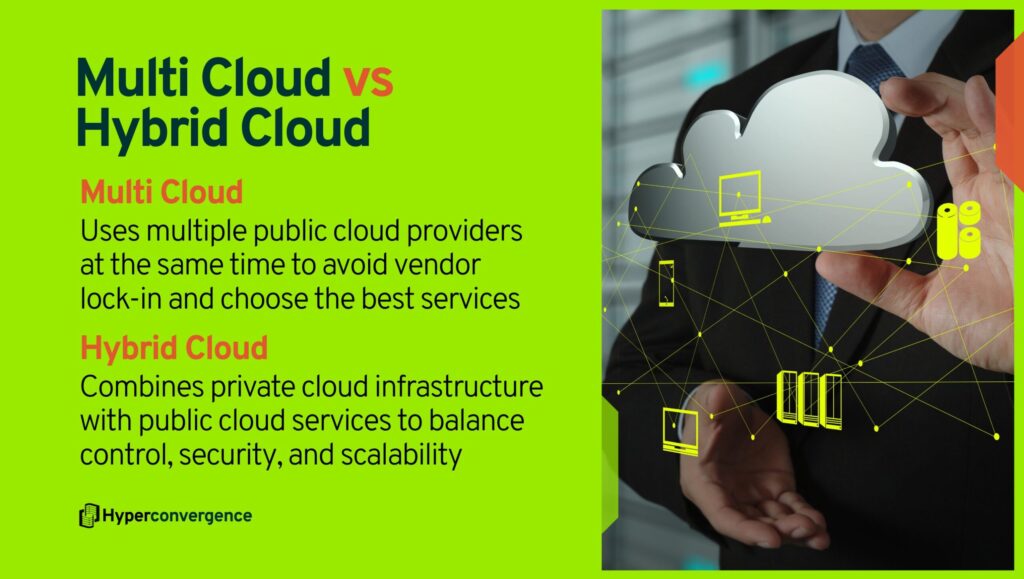
- Multi‑Cloud: It refers to using two or more public cloud providers at the same time. For instance, a company might run AI workloads on Google Cloud, store files on AWS, and process analytics on Azure. This approach helps avoid vendor lock-in, choose the best services, and manage costs.
According to a 2025 Presidio report, 78% of organizations deploy workloads across multiple public clouds.
- Hybrid Cloud: Hybrid cloud, on the other hand, combines a private cloud environment with public cloud services. Sensitive or mission-critical data remains on private infrastructure, while less critical workloads run in the public cloud. This model offers flexibility, scalability, and compliance.
Around 82% IT leaders report using hybrid cloud strategies to balance control and growth.
How to Choose Between Public Cloud vs Private Cloud?
Deciding between a public cloud and a private cloud comes down to understanding your priorities- security, scalability, cost, and control. We shortlisted the most important criteria to guide your selection:
✅ Choose Public Cloud if your priority is:
- Speed and Time to Market: Need to spin up resources in minutes? Public cloud enables rapid deployment and experimentation.
- Elastic Scalability: Ideal for unpredictable or seasonal workloads (e-commerce spikes, product launches, analytics projects).
- Cost Flexibility: No upfront hardware investment. You only pay for what you use, making it ideal for startups or teams with limited CAPEX.
- Access to Advanced Technologies: Public cloud platforms offer ready-to-use AI/ML, serverless computing, data analytics, and global content delivery.
Best for: Startups, SaaS products, digital applications, and rapid innovation projects.
✅ Choose Private Cloud if your priority is:
- Security, Data Control & Compliance: Sensitive workloads? Regulatory requirements? Private cloud ensures data stays in a dedicated environment under your governance.
- Predictable Cost Over Time: Higher upfront investment, but more stable cost structure in the long term.
- Customization: You control the architecture- hardware, networking, security policies tailored to your business.
Best for: Finance, healthcare, government, and enterprises with strict data governance.
| Priority | Best Fit |
| Speed, Agility, Low Entry Cost | Public Cloud |
| Control, Security, Compliance | Private Cloud |
What Are the Top Cloud Deployment Models?
There are four top cloud deployment models, which include:

1. Public Cloud: The public cloud operates in a shared infrastructure where resources are owned and managed by providers like AWS, Azure, or Google Cloud. This public cloud environment is ideal for scalability and cost efficiency, making it popular for startups and dynamic workloads.
2. Private Cloud: It offers a dedicated setup, either on-premises or hosted, where a single organization controls the infrastructure. A private cloud environment provides greater customization, compliance, and security for industries handling sensitive data.
3. Hybrid Cloud: A hybrid cloud combines public and private infrastructure, allowing data and applications to move seamlessly between both. This hybrid cloud environment gives organizations flexibility and balance between control and scalability.
4. Multi-Cloud: Multi-cloud uses multiple public cloud deployments from different vendors to avoid vendor lock-in and enhance resilience.
Choosing the best cloud deployment model depends on your organizational goal in terms of performance, scalability, and compliance, along with the top cloud servers that deliver reliable infrastructure for each environment.
The Bottom Line
Public and private clouds both deliver agility, efficiency, and modern cloud computing capabilities, but they solve different problems. The public cloud excels when speed, scalability, and innovation matter. It lets businesses move fast, experiment, and scale globally without heavy upfront investment.
The private cloud shines when security, control, and compliance take priority. It offers a dedicated environment for sensitive workloads, regulatory governance, and predictable performance.
So, there’s no one-size-fits-all answer. The right choice depends on your organization’s goals:
Choose public clouds for speed and flexibility. Choose private clouds for control and security.
However, some modern businesses combine both through hybrid or multi-cloud approaches, making their IT faster, safer, and more adaptable.
FAQs
Public cloud uses shared infrastructure managed by a provider, whereas a private cloud is dedicated to one organization and offers more control and customization.
Private cloud offers stronger data control and governance since resources aren’t shared. Public cloud is secure, too, but shared responsibility applies.
However, Gartner reports that through 2025, 99% of cloud breaches are caused by customer-side misconfigurations– not the provider.
A hybrid cloud combines public and private clouds, allowing data and applications to move between environments.
VMware Cloud Foundation or OpenStack running in an enterprise data center is a common example. Banks, hospitals, and government agencies use private clouds for regulatory compliance.
Google Cloud Platform (GCP) is a public cloud provider offering compute, storage, and AI/ML services.
No. Netflix primarily runs on AWS public cloud, leveraging its global scalability, reliability, and extensive compute resources.
Yes. Most banks and financial institutions use private or hybrid clouds to meet compliance requirements such as PCI-DSS and data residency rules.
Public cloud uses operational expenditure (OPEX): pay-as-you-go. Meanwhile, a private cloud requires capital expenditure (CAPEX) because you own the infrastructure.
AWS is a public cloud provider, although it also offers a virtual private cloud (VPC) for isolated environments
Public cloud is cheaper upfront due to pay-as-you-go. Private cloud becomes cost-efficient long-term for stable workloads because you avoid variable usage fees.
Yes. Gmail is a public cloud SaaS (Software as a Service) application provided by Google.
Yes, absolutely. This is called a hybrid or multi-cloud approach, and above 80% of enterprises use this model to handle modern workloads.
In a public cloud setup, top risks include misconfiguration, unauthorized access, and insecure APIs.
Startups usually benefit from public cloud, thanks to its built-in security tools (IAM, encryption, firewalls) and no upfront cost.
Microsoft Azure is a public cloud provider, but it also offers Azure Stack for private cloud deployments.